

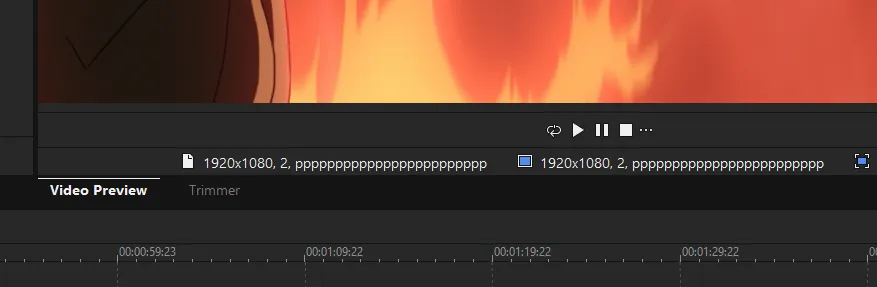
I'm on Vegas 23 build 356. Every time I skip a frame or perform any action, another "p" is added below the preview shown in the screenshot above, where it should be displaying stats like frame rate instead. Skipping to a different frame adds exactly 3 extra "p" every time. Eventually it exceeds the bounding box for the text there and vanishes.
In Project Preferences, the "Pixel aspect ratio" and "Frame rate" fields are pulling the bottom string from the Template drop-down menu (HDV 1080-24p 1440x1080), and those templates no longer display their frame rates but in some places display Chinese characters instead:
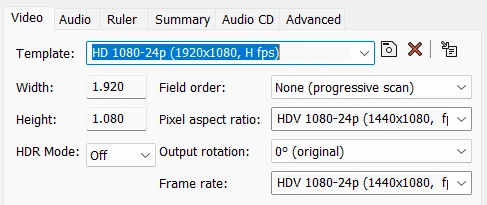
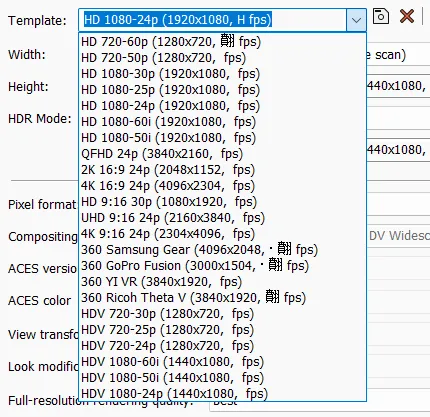
Text corruption exists in other places throughout Vegas. Eventually the program crashes because of it. Uninstalling Voukoder Pro fixes the issue. I have tried reinstalling both it and Vegas as well as removing all cached files and settings, didn't work.

Voukoder Pro 3 causes UI text corruption in Vegas 23 when using a comma-decimal locale Regional Format in Windows
-
- Behoben
-
Argonil -
17. Januar 2026 um 07:23
-
-

Vouk
17. Januar 2026 um 09:16 Hat das Thema freigeschaltet. -
Hello,
Build 356 was withdrawn on 18th December 2025 due to various issues including problems with the playback cursor on some systems. You should install previous version
-
I rolled back to 302 but the issue persists.
Root cause found: Windows Regional format (decimal comma) breaks VEGAS/Voukoder UI/template metadata
I had severe UI corruption in VEGAS Pro 23 build 302 (template FPS values missing/garbled, random characters, fields showing wrong strings, preview UI text accumulating, etc.) that persisted across reinstall, cache resets, sfc /scannow, driver changes, removal of other plugins, even clean boot.
Fix: Changing Windows Settings -> Time & language -> Language & region -> Regional format from a comma-decimal locale (e.g., English (Denmark)) to a dot-decimal locale (e.g., English (United States)) immediately resolved the issue.
This strongly suggests a locale parsing/formatting bug (comma vs dot decimal) affecting Voukoder Pro plugin's parsing. Reproducible on my system; persists until regional format is changed (or until Voukoder Pro is uninstalled.)
Request: handle locale-aware numeric parsing/serialization (use invariant culture or explicit locale)
(and kindly grant me a Voukoder Pro key since I had to spend my trial solving this bug. My trial key became invalid when I did every possible thing to diagnose the issue, probably when I deleted appdata folders.) -
Argonil
17. Januar 2026 um 22:35 Hat den Titel des Themas von „Voukoder Pro 3 causes UI text corruption in Vegas 23“ zu „Voukoder Pro 3 causes UI text corruption in Vegas 23 when using a comma-decimal locale Regional Format in Windows“ geändert. -
- Offizieller Beitrag
As Marko65 noted this issue was a known issue in VEGAS Pro, not in Voukoder Pro, but I can give you ...
- Allow you to re-register for the trial version, so you have 14 days more to test
- A discount code about 10 EUR
-
As Marko65 noted this issue was a known issue in VEGAS Pro, not in Voukoder Pro, but I can give you ...
- Allow you to re-register for the trial version, so you have 14 days more to test
- A discount code about 10 EUR
I would like that.
Marko65 noted a different issue than mine on build 356, and I'm now on build 302 where my issue still happens, it was unrelated to the build. Since this issue only appears when combined with the Voukoder Pro plugin and not any other plugins, it would be odd if it was Vegas that is at fault, but I suppose it's possible. It does seem more likely that the Voukoder Pro plugin doesn't have locale-aware numeric parsing in some place, if it was Vegas then it should occur when I set my system's decimal character to comma in Regional Format regardless of whether Voukoder Pro is installed or not.
Perhaps you have not had your coffee yet? It is very early.
-
- Offizieller Beitrag
Argonil
You should be able to register your trial again.What was your language/country setting when this has happened?
-
What was your language/country setting when this has happened?
English (Denmark). Swapping it to English (United States) or simply changing the decimal character from comma to dot fixes the issue.
-
Hi,
I have the same issue on Vegas 23 b302 and also VP22 b250. The regional setting is german (Deutsch(Deutschland)), but changing the decimal format did not solve the problem here. I haven't done any further experiments yet regarding re-installation etc.
Voukoder version is 2026.0.15.0
Nils
-
- Offizieller Beitrag
Does the number parsing issue appear anywhere in Voukoder Pro or just in VEGAS Pro? If it appears in Voukoder Pro where exactly does it happen?
-
Vouk
23. Januar 2026 um 17:27 Hat das Label In Bearbeitung hinzugefügt. -
I uninstalled Voukoder 2026.0.15.0 today and the problem disappeared completely in both VP22 and VP23. After that I installed the latest Voukoder 2026.0.17.0, but just for VP23. Now the issue only reappeared in VP23, whereas VP22 is still ok.
Still no luck with changing the decimal separator from "," to ".", even after reboot. It really looks like Voukoder is the main suspect here. Any further Ideas to solve this?
Nils
-
- Offizieller Beitrag
Does the number parsing issue appear anywhere in Voukoder Pro or just in VEGAS Pro? If it appears in Voukoder Pro where exactly does it happen?
-
Does the number parsing issue appear anywhere in Voukoder Pro or just in VEGAS Pro? If it appears in Voukoder Pro where exactly does it happen?
I went through the main Voukoder dialogs and Scene Designer and they look ok. Seems it only happens in Vegas Pro itself.
Nils
-
- Offizieller Beitrag
I'll discuss this with the VEGAS developers.
-
Same issue here, changing the decimal separator from "," to "." helps.
I Use Vegas Pro 23 (Build 356) and Voukoder 2026.0.17.0.
-
- Offizieller Beitrag
I did not receive any updates from the VEGAS Pro team yet, but can you guys test if https://d.voukoder.org/VoukoderPro-2026.0.19.msi helps? I've switched the region settings from en-us to neutral for the VEGAS Pro plugins.
-
I`ve tired the suggested Version.
Unfortunately the same issue, nothing changed.
-
No changes here too and going from "," to "." still isn't working for me.
Nils
-
- Offizieller Beitrag
Alright, so I reverted that change. And I have to wait for the VEGAS Pro developers response.
-
- Offizieller Beitrag
Still got no reply from the VEGAS Pro team regarding this issue.
-
Are there any news about this issue?
It' s now over a month ago.I'm disappointed, because I payed 69€ for the upgrade and I cannot use it since january.
-