Voukoder Pro 2026

    • Offizieller Beitrag

    The next version has been dropped: The windows version of Voukoder Pro 2026

    The mac version will follow. It basically compiles already but i still have issues with codesigning, notarization - which is required for mac apps since tahoe.

    Changes / Fixes

    • Core
      • Disabling a track doesn’t cause Voukoder Pro to create an empty track anymore
      • If FFmpeg could not be found inform the user in a user friendly message
      • It’s possible overwritten filenames can contain apostrophes
      • Muxer options (i.e. +faststart) are working again
      • Using FFmpeg 8.0 now
      • Sorting video tracks first, audio tracks are second
      • Optimized the compiler flags that resulted in around 8% performance increase
      • Validating the license seat count more reliably
    • Logging
      • Added the menu option to open the log dir.
      • Added a dropdown box in the settings to change to log level
      • Added a check box to the settings to enable or disable the logging
      • Added colors to the scene test log view
      • Added the option to select the number of days when to delete log files
      • Printing the system information at the beginning of each log file
      • Added a “Copy to clipboard” button
    • NLE Plugin
      • [VEGAS Pro 23] Added a new plugin.
      • [VEGAS Pro] Probably fixed the issue Voukoder Pro is not displayed to some users
    • Designer
      • Added back IAvoe’s presets [FFV1, libsvtav1, libx264 and libx265 encoders (if present)]
      • The Designer supports re-opening the last open tabs
      • Supporting different 5.1 audio channel layouts now (Selectable over the input node)
      • It is now possible to add the ISO date and time when overwriting the file name in the file properties.
      • The “About” dialog has been reworked so you can see more information about your license.
      • Added a textual description to all video pixel formats and audio sample formats
      • Extended the “Open-Scene” dialog in the designer.
      • You can now select and open and delete multiple files.
      • There is also a new button where you can rename a single scene.
      • Scene Test
        • Made the simulated video- and audio tracks editable and deletable again
        • Fixed measuring the time (and corrected the fps) in the scene test
      • Languages
        • Added translations for multiple other languages:
          • Chinese
          • Japanese
          • Korean
          • Russian
          • Brazilian (Portuguese)
          • French
          • Spanish
          • German
          • (Tell me if you need more, please also report if translations are not correct)
    • Installer
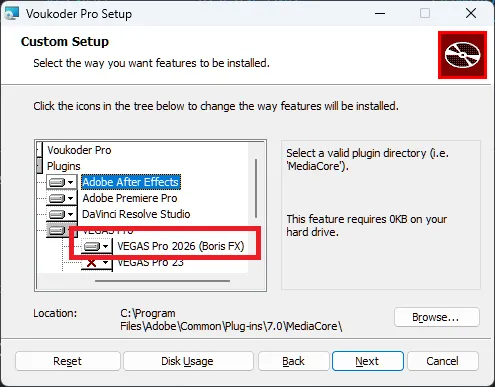
      • Expanded the VEGAS Pro Plugin section, so users are more aware they have to check their version here
    • Licensing (Added an alternative, monthly subscription model license, still to come)
  • I've added support for VEGAS 2026 from the new owner Boris FX in version 2026.1.0.

    Great stuff. Confirmed that the installation works with BV2026 and render run as expected.

    (Don't forget to remove my install script from the download page as it is no longer necessary). :)

  • Hello.
    I am used to run Voukoder Classic on Vegas Pro 22.
    Now I upgraded to Vegas Pro 2026 (Boris FX) and I should upgrade to Voukoder Pro.
    Everything is installed. Created a couple of "scenes", got a Trial License Key and...
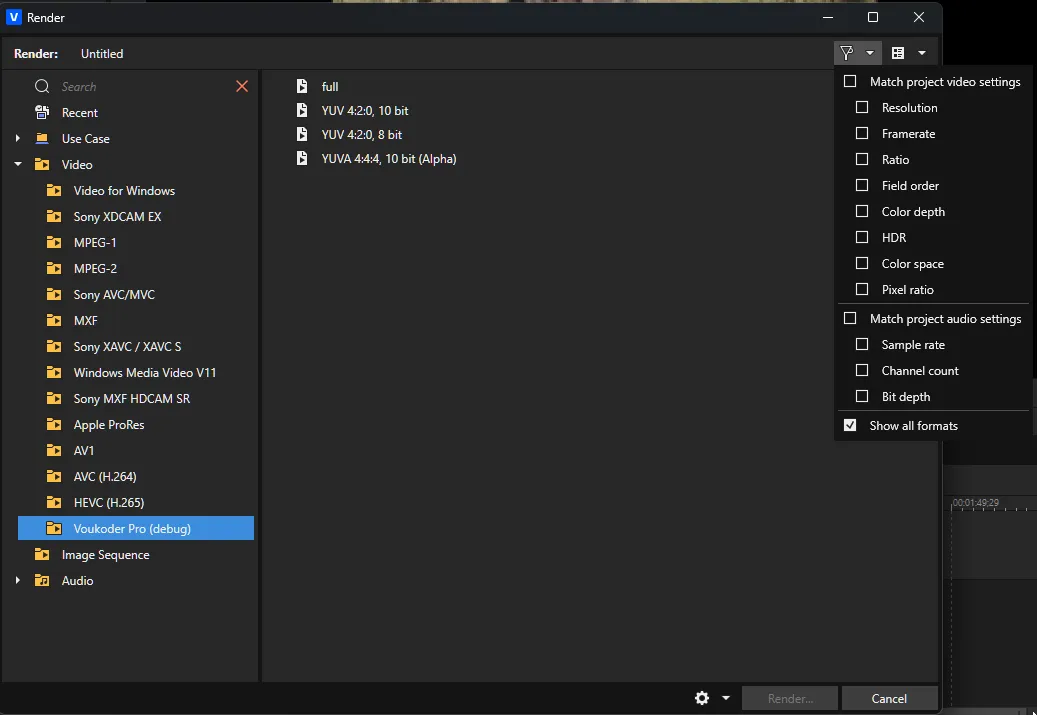
    Voukoder do not show up as a rendering option. It is not even hidden. It is like it was not installed /connected to Vegas Pro 2026 yet.
    What am I missing?
    Yes, Vegas Pro 22 and Voukoder Classic are still installed in my system since I have important projects on the run using them.

    Also, I noticed that I can use Voukoder to render to DXV codec, which I use a lot as a VJ running Resolume Arena. But the codec properties do not show option to "High Quality with Alpha".

    Any help is appreciated. Thank you!

    Paulo

    • Offizieller Beitrag

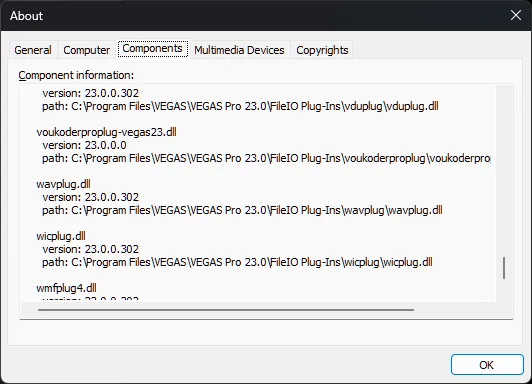
    PFelby So you can see the voukoderproplug-vegas23.dll here?

    ... but not here?

    even if "Show all formats" is checked?

    If so, that's one of the bugs in VEGAS Pro that's the reason why VEGAS Pro is only supported with the "some users have issues" foot note. Some users have the issue, some not. I had my code check by the VEGAS Pro developers back when Magix was still the owner, and their feedback was my code is okay. I only got this fixed myself when I was reinstalling Windows and all programs.

    If anybody finds the reason why this is happening this'd help me alot.

    Did you install Voukoder Pro for VEGAS Pro 22 too? Does it work there? It can be installed together with Voukoder Classic.

    DXV

    Voukoder Pro uses FFmpeg internally for the export. But FFmpeg 8.1 does not support this format / texture with DXV yet.

    Code
    Encoder dxv [Resolume DXV]:
       General capabilities: dr1 threads
       Threading capabilities: frame and slice
       Supported pixel formats: rgba
    DXV encoder AVOptions:
     -format            <int>        E..V....... (from 1.14664e+09 to 1.14664e+09) (default dxt1)
        dxt1            1146639409   E..V....... DXT1 (Normal Quality, No Alpha)

    As soon as FFmpeg supports DXT3 and DXT5 with DXV Voukoder Pro will be able to export it too.

  • PFelby So you can see the voukoderproplug-vegas23.dll here?

    NOPE.
    I never ran VegasPro 23 and/or Voukoder for Vegas 23. Just the Voukoder Classic along Vegas Pro 22.

    I downloaded and installed directly Voukoder Pro 2026 for Windows.
    Installed, requested the trial license and registered, created a couple of scenes, saved them and I can´t see any Voukoder Plugin listed as an installed component on Vegas Pro 2026.
    Voukoder Classic is still running on Vegas Pro 22.

  • I used this: VoukoderPro-x86_64-2026.1.3.msi
    I feel stupid. Something is wrong.

    There´s no option to install to "VEGAS Pro 2026 (Boris FX)"
    Actually, all VEGAS options are "X"ed. Latest that I could enable would be Vegas Pro 23.

    Thank you.