

Thanks for your suggested improvements.
I'll address all of this in the next version.
Thanks for your suggested improvements.
I'll address all of this in the next version.
No, it is not on by default. But it's good we now know the reason for it.
Can you paste a screenshot to explain exactly what you are missing?
What "Voukoder Pro" release are you using?
What version of FFmpeg did you install?
S16LE is probably the best choice.
Seems like your version is a bit too new.
These DLLs are required:
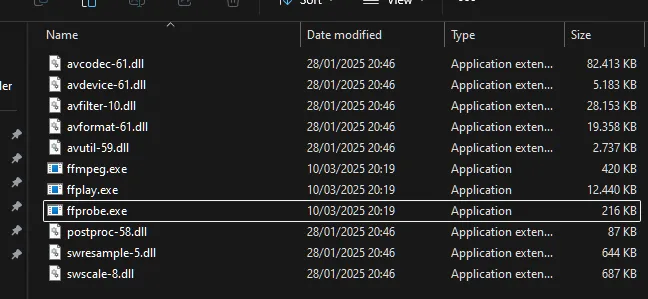
I've put this bug to my list of todos.
I'll try to reproduce the issue. It shouldn't be like that.
What NLE are you using?
It is called libsvtav1.
I'm working on my todo-list. But if this get's implemented it'll be be in version 3.x which will most likely get released in the next year.
Still, It's not so complicated. Read the quickstart section of the documentation: Create a simple scene, double click on both encoder nodes and the UI is pretty much the same from there on.
All encoders in the Nvidia, AMD and Intel groups are GPU based encoders. All others are CPU based encoders.

Works for me. I tested it with h264_nvenc/aac/mp4 just now. It's playing flawlessly. I just fixed muxer settings were not applied before 2.0.12.
Edit: Do other users experience this too?
What issues do you have with v2.0.12?
I am in contact with the Magix guys now.
The original Voukoder was able to do this for x264 by exporting first the analysis file and then reading it in again with the 2nd and final render. But not many people are using this nowadays.
That's really interesting. I just don't understand if there are any connections. I'll upgrade to Build 248 first.
You should open one of the provided Voukoder Pro templates first and edit it and supply a "Scene" there first. This is required due to the different VEGAS Pro workflow.
Alright. That means the FFMpeg installation is also correct!
I have sent an eMail to Magix about this. I'll keep you informed.
Does the startup of the "Designer" app work? It should have been installed on your windows desktop.