

HDR Encoding Guide for Premiere Pro

  • Yes! Got it working now, thank you so much!

    Didn't realize the file wasn't a proper MP4, sorry. If you ever need to import and work with MKV files directly, the Autokroma Influx importer plugin makes it a seamless process. Just FYI.

    For anyone else reading this, basically import the file, create a sequence, and go straight to Export to set up the exporter settings to "Rec. 2020 PQ (HDR10)" and "4:2:2" as per morphinapg's post above. Unless your project color settings were changed from defaults, nothing else needs changing.

    I think I did find a bug though. If you set up the exporter with 4:2:0 [...] It won't work. Only 4:2:2 worked for me. I used that since my footage is already 4:2:2 anyway, but I didn't realize the 4:2:0 option wasn't working correctly until just now.

    Can confirm. 4:2:2 worked. 4:2:0 didn't. This was the reason my yesterday tests failed. Looks like a bug.

    Also, you shouldn't need this now: "colorprim=bt2020:transfer=arib-std-b67:colormatrix=bt2020nc" in the encoder

    Yep. I did two tests, with these params and without them. The file sizes are identical and HDR output is the same. Do color params get ignored on export now, or do the settings from Premiere's Export tab take priority? Whatever it is, things got even easier.

    Vouk and morphinapg, I want to thank both you again for all your help. I was going out of my mind trying to get this thing to work for a while now, so this feels like a dream come true. I'll be working on a lot of HDR files soon (want to back up my entire home library to AV1), so if I encounter any more issues, I'll let you guys know. Cheers!
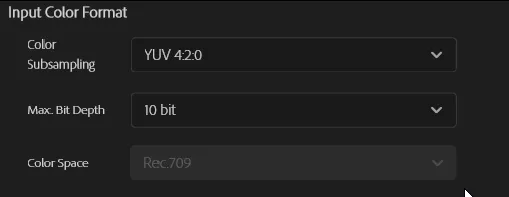
  • Heads us: I just tested 3.20.0 and 4:2:0 is still a problem. The issue seems to be that you can't change Color Space from Rec.709 to Rec.2020 anymore when 4:2:0 is selected, so the output becomes a non-HDR conversion to Rec.709:

  • So premiere's HDR output only natively supports YUV 422? That's interesting. It's not a big problem, but perhaps the flow of the UI could be redesigned somewhat to be more user friendly.

    Maybe allow the user to select Color Space first, and then filter the options available for Bit Depth and Color Sampling based on that. If they select an HDR mode, they'll be restricted to 10bit, YUV422. If they select Rec709, then the other options are available.

  • I've noticed a major issue in HDR encoding if you use Media Encoder. It seems HDR encoding is currently NOT working through Media Encoder. This is happening on Adobe's own encoders as well, so it's not a Voukoder issue. Media Encoder will automatically tonemap the sequence down to SDR. The file exported will still be in an HDR container, but will NOT be the correct colors. With Adobe's encoders, it will take the SDR values and simply inject HDR metadata. With VoukoderPro, it seemingly keeps the SDR tonemapped image and maps that within an HDR colorspace, so it looks more correct but is lacking all dynamic range expansion of HDR.

    If you're working in HDR in Premiere, you will currently NEED to export directly in Premiere.

    I don't know if this is a new bug or not as my old process involved exporting HDR by telling premiere and media encoder they were SDR when they weren't, so that old process would have worked fine right now but I edited my new project with HDR compositing and effects in mind since I knew VoukoderPro could now natively support HDR from premiere, but unfortunately for long exports this seems problematic at the moment until Adobe solves this bug.

    Einmal editiert, zuletzt von morphinapg (5. Oktober 2026 um 14:37)