Beiträge von amissat
-
-
A few low-priority bugs and issues I found while testing Transcoder:
1) If you have a second unconnected Video Input in a scene, it'll cause a job to fail:
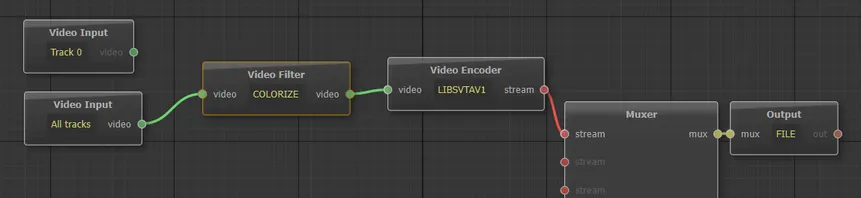
2) If you open both Transcoder and Designer and make changes to a scene in Designer, Transcoder won't see the new changes unless you either restart it or click on Edit Scene (which then correctly loads the updated version). I'm guessing Transcoder preloads all the scenes at startup and doesn't bother checking for updates before running a job. To fix, it the active scene needs to be reloaded when a job starts.
A related note: right now, if you click on Edit Scene inside Transcoder, the main Transcoder window becomes unresponsive until you close the scene editor. I feel like allowing the scene editor to run on the side while still having full access to the main Transkoder window would be more useful for rapid testing. It's really not a big deal since, as pointed out above, you can already achieve this behavior by running Transkoder and Designer simultaneously once the issue above is fixed, so I'm just mentioning it as a throwaway thought and something to consider.
3) Don't know if it's really a bug or just me, but I can't CROPDETECT to work. Tried incrementing Limit to crazy numbers, still nothing. Here's the graph:

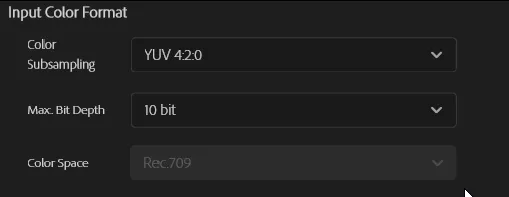
The 4:2:0 HDR bug you already know about, so that's it for now. Hope this feedback is helpful. I’ll let you know if I spot any other issues.

-
Yes! Got it working now, thank you so much!
Didn't realize the file wasn't a proper MP4, sorry. If you ever need to import and work with MKV files directly, the Autokroma Influx importer plugin makes it a seamless process. Just FYI.
For anyone else reading this, basically import the file, create a sequence, and go straight to Export to set up the exporter settings to "Rec. 2020 PQ (HDR10)" and "4:2:2" as per morphinapg's post above. Unless your project color settings were changed from defaults, nothing else needs changing.
I think I did find a bug though. If you set up the exporter with 4:2:0 [...] It won't work. Only 4:2:2 worked for me. I used that since my footage is already 4:2:2 anyway, but I didn't realize the 4:2:0 option wasn't working correctly until just now.
Can confirm. 4:2:2 worked. 4:2:0 didn't. This was the reason my yesterday tests failed. Looks like a bug.
Also, you shouldn't need this now: "colorprim=bt2020:transfer=arib-std-b67:colormatrix=bt2020nc" in the encoder
Yep. I did two tests, with these params and without them. The file sizes are identical and HDR output is the same. Do color params get ignored on export now, or do the settings from Premiere's Export tab take priority? Whatever it is, things got even easier.
Vouk and morphinapg, I want to thank both you again for all your help. I was going out of my mind trying to get this thing to work for a while now, so this feels like a dream come true. I'll be working on a lot of HDR files soon (want to back up my entire home library to AV1), so if I encounter any more issues, I'll let you guys know. Cheers!
-
Oh interesting, I wasn't aware you were able to incorporate the native HDR system. I'll test that out now. If this works this is definitely the much preferred way to do it.
Testing... and confirmed! It looks perfect!
Okay, so this significantly streamlines our workflow now (and basically makes this thread obsolete). Just make an HDR project, export to VoukoderPro with the Rec. 2020 PQ (HDR10) or Rec.2020 HLG options, depending on your footage/sequence, and then apply your standard encoding nodes. Optionally, use the HDR tab in your chosen video encoder to provide MaxCLL/MaxFALL metadata if you have it (I personally analyze my footage to get it as part of my grading process).Thanks for this. Did you double-check that it's true HDR, with all the HDR metadata present, and not a similarly-looking conversion? I'll try to find time to run some tests of my own tomorrow. Very excited to see HDR working again.
EDIT: tried running a couple of quick tests on the file I linked earlier before going to bed, no luck achieving the correct results with this. The closest one still looked like a conversion. Didn't have time to check metadata or even MediaInfo. Will try again tomorrow. In the meantime, could I please bother you with giving this particular video a test run and confirming that the encoded result has HDR and works on your end? What settings need to be changed on a clean new file import, apart from setting Color Space Rec 2020 on the Export tab and "colorprim=bt2020:transfer=arib-std-b67:colormatrix=bt2020nc" in the encoder?
-
No, we have to set things as rec709 in Premiere just so that premiere doesn't do an automatic color space downconversion of the source HDR values to SDR, since you've said you can't access the native HDR formats from Premiere.
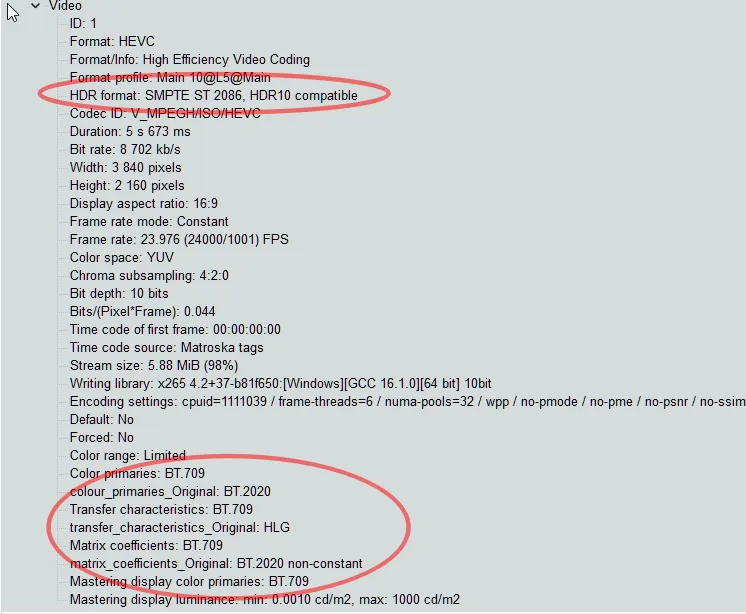
Thank you very much for trying to figure it out. I tried going through the things you mention and did some more tests, and it it looks like the "brightened HDR" thing I mentioned above was a result of the automatic color space conversion you're talking about and not true HDR. When I looked at the MediaInfo data earlier, I focused on the "HDR format" field. But now I noticed looked further down and noticed that the Color Primaries and the rest are still BT.709. So it appears that I simply can't get real HDR transfer to work either and was simply tone mapping from HDR to SDR:
Also, the settings in Video Input→Colors don't seem affect the output. I tried setting all three values to BT.709 and then to BT.2020NC/SMPTE-2080. The MediaInfo values stayed exactly the same for both files. Really hoping somebody smarter and more knowledgeable than I am will figure this out.
-
It took longer than I thought (I managed to almost kick the bucket and get two major surgeries in the meantime) but I'm finally back to trying to make HDR work. I completely removed all Adobe and Voukoder Pro from the system, reinstalled both using the latest 2026 versions, and created a new project just to test this. No matter what settings I change, I ether get no HDR at all (washed out colors) or the same slightly brightened result as earlier:
Is it possible to ask somebody to run their own test on this exact video sample? https://filebin.net/mq9kwzze56ohy22t
If the HDR looks good from the first glance, please make sure to open the original and compare them either side by side or by quickly switching between the two windows, because the difference is easily to miss from memory. If you output looks identical, could you please share your exact settings for the process?
Premiere has color settings in:
• Modify → Color
• Sequence Settings → Color Management (plus the Advanced collapsible section)
• Project Settings → ColorVoukoder Pro has color settings in:
• Video Input → Colors
• Video Encoder → HDR
• Video Encoder → encoder settings (for LIBX265, I tried "colorprim=bt2020:transfer=arib-std-b67:colormatrix=bt2020nc" as X265 params and • yuv420p10le as the format)Sorry to ask, but I've already spent hours on this myself, even blindly trying different variations off all the settings above at some point, and have nowhere else to turn. If somebody could take a look and point me in the right direction, I'd greatly appreciate it.
-
Sorry I didn't follow up sooner. I made several other tries with the same slightly overbrightened end result. Tried reimporting the source file, creating a new sequence, double-checking everything was on Rec. 709, etc. The only thing I didn't try was another codec within Voukouder, instead of SVT-AV1. Something I wanted to do but got distracted. Exporting in HEVC directly through Premiere came out fine.
So the next thing I'll try is installing the latest version of Premiere 2026 that just came out, the latest version of Voukoder, et cetera, and trying again on vanilla settings. May take me a couple of weeks to find the time, but I'll try to post all my exact settings to make sure someone can reproduce this if I still have this problem. I can't believe Adobe just deleted that post like that.
-
[W]hat you need to do is interpret your source videos as rec709, and also make sure your timelines are set to rec709 so that no color conversions are happening, before you send them to voukoder.
I've you've done all that and are still having problems, I would recommend making a new timeline from your footage, and then copying your edits from the other timeline into it. I had an issue with newer versions of premiere where shots I was rendering for VFX work were coming out slightly higher despite the footage and timeline being set to rec709 before encoding, but copying my edits to a new timeline that was rec709 from the start solved that for me.
Thank you. It's already set as Rec709, but I'll try your timeline suggestion next week. Hopefully it'll fix it.
And thank you Vouk for working on it. If you could improve the HDR workflow, it would be a great help.
-
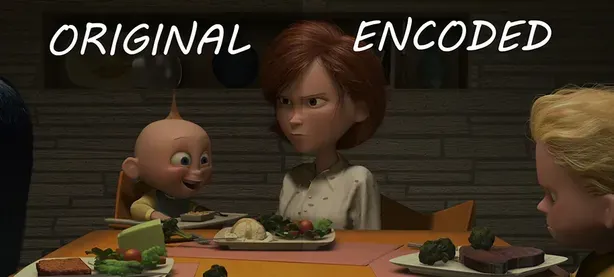
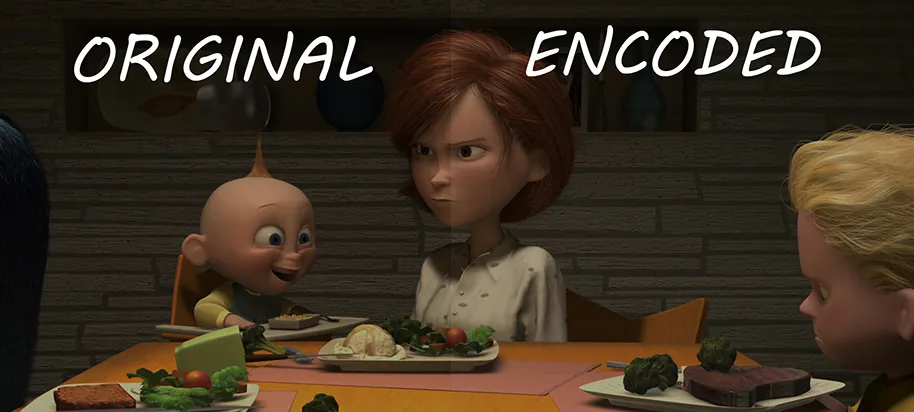
Hi, can somebody please help me with correctly processing HDR with Voukoder and Premier Pro 2025? I'm trying to set up Voukoder to convert my entire library to AV1, but HDR is giving me headaches. I tried changing all kinds of settings (Matrix/Primaries/Transfer in Voukoder's Video Input, Output Color Space in Sequence Settings, Override Media Color Space in Interpret Footage, etc.), but no matter what I do, the end result is always slightly brighter than the original:
Here's a short sample of The Incredibles I've been trying to convert:
And here are the relevant svtav1-params (I removed the rest to make sure it wasn't something else):
Any idea what settings I should use to correct this? I'm largely a newb when it comes to encoding HDR, so my hope is that it's something very simple.