

Transkoder: Various minor bugs/issues

  • A few low-priority bugs and issues I found while testing Transcoder:

    1) If you have a second unconnected Video Input in a scene, it'll cause a job to fail:
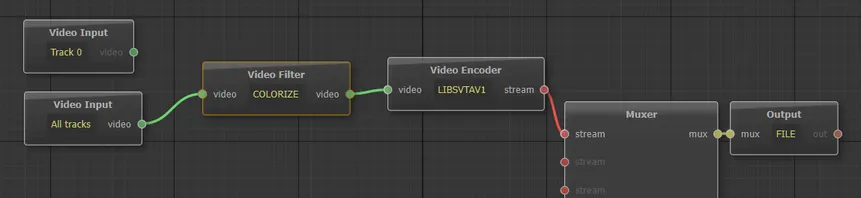
    2) If you open both Transcoder and Designer and make changes to a scene in Designer, Transcoder won't see the new changes unless you either restart it or click on Edit Scene (which then correctly loads the updated version). I'm guessing Transcoder preloads all the scenes at startup and doesn't bother checking for updates before running a job. To fix, it the active scene needs to be reloaded when a job starts.

    EDIT: I tried saving a new scene in Designer. Predictably, it didn't show in Transcoder until a restart. So in addition to reloading the active scene at the start of a job, I'd also probably refresh the scene list each time the user clicks on the scene selection dropdown menu, to make sure it's up to date.

    A related note: right now, if you click on Edit Scene inside Transcoder, the main Transcoder window becomes unresponsive until you close the scene editor. I feel like allowing the scene editor to run on the side while still having full access to the main Transkoder window would be more useful for rapid testing. It's really not a big deal since, as pointed out above, you can already achieve this behavior by running Transkoder and Designer simultaneously once the issue above is fixed, so I'm just mentioning it as a throwaway thought and something to consider.

    3) Don't know if it's really a bug or just me, but I can't get CROPDETECT to work. Tried incrementing Limit to crazy numbers, still nothing. Here's the graph:

    The 4:2:0 HDR bug you already know about, so that's it for now. Hope this feedback is helpful. I’ll let you know if I spot any other issues.

    Einmal editiert, zuletzt von amissat (4. August 2026 um 22:30) aus folgendem Grund: Additional details for #2.

  • Vouk 4. August 2026 um 18:27

    Hat das Label In Bearbeitung hinzugefügt.
  • Vouk 5. August 2026 um 09:28

    Hat den Titel des Themas von „Various minor bugs/issues“ zu „Transkoder: Various minor bugs/issues“ geändert.
    • Offizieller Beitrag

    About the CROP / CROPDETECT filter:

    Zitat

    This isn't a bug in your code — it's a fundamental limitation of how FFmpeg's cropdetect works. cropdetect is an analysis-only filter: it detects crop boundaries and writes them to frame metadata (lavfi.cropdetect.x/y/w/h), but it doesn't modify the video stream. The separate crop filter doesn't read that metadata — it uses static parameters.

    In the FFmpeg CLI, the typical workflow is a two-pass approach: first run cropdetect to detect values, then apply crop with those values. In a single-pass filter graph (as Voukoder Pro uses), there's no mechanism for cropdetect to feed its detected values back to crop dynamically.

    • Offizieller Beitrag

    Also fixed the errors:

    • With input nodes not connected to an output node.
    • Transkoder: Avoid displying horizontally compacted columns if no scenes.json file is there
    • Transkoder: Prevent running the transcoding if no scenes are available.
    • Transkoder: Using a QFileSystemWatcher that triggers reload of the scene selections and removed the manual actions (That solves also the Blocking Transkoder all when the Designer is open)
  • About the CROP / CROPDETECT filter:

    In the FFmpeg CLI, the typical workflow is a two-pass approach: first run cropdetect to detect values, then apply crop with those values. In a single-pass filter graph (as Voukoder Pro uses), there's no mechanism for cropdetect to feed its detected values back to crop dynamically.

    So there's no way to get it to work? Maybe it makes sense to remove the filter altogether, at least for now.

    Also, another very minor UI issue: there are 2 identical MATROSKA values in the Muxer node's General tab.