

I just don't understand why they would. They mentioned pixel formats clearly specific to HDR workflows, based on what I quoted from post 78 above. Why would they mention that but then shut down any questions about that? If they just wanted their own exporters to use those formats, I wouldn't think they would be mentioned at all.

HDR Encoding Guide for Premiere Pro
-
-
It took longer than I thought (I managed to almost kick the bucket and get two major surgeries in the meantime) but I'm finally back to trying to make HDR work. I completely removed all Adobe and Voukoder Pro from the system, reinstalled both using the latest 2026 versions, and created a new project just to test this. No matter what settings I change, I ether get no HDR at all (washed out colors) or the same slightly brightened result as earlier:
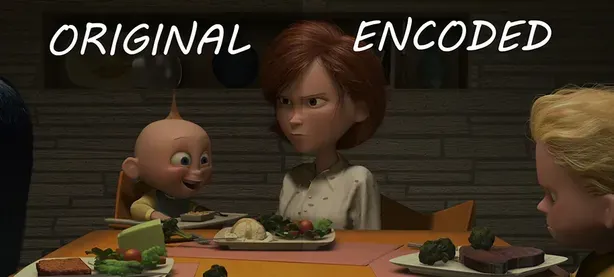
Is it possible to ask somebody to run their own test on this exact video sample? https://filebin.net/mq9kwzze56ohy22t
If the HDR looks good from the first glance, please make sure to open the original and compare them either side by side or by quickly switching between the two windows, because the difference is easily to miss from memory. If you output looks identical, could you please share your exact settings for the process?
Premiere has color settings in:
• Modify → Color
• Sequence Settings → Color Management (plus the Advanced collapsible section)
• Project Settings → ColorVoukoder Pro has color settings in:
• Video Input → Colors
• Video Encoder → HDR
• Video Encoder → encoder settings (for LIBX265, I tried "colorprim=bt2020:transfer=arib-std-b67:colormatrix=bt2020nc" as X265 params and • yuv420p10le as the format)Sorry to ask, but I've already spent hours on this myself, even blindly trying different variations off all the settings above at some point, and have nowhere else to turn. If somebody could take a look and point me in the right direction, I'd greatly appreciate it.
-
 Alles anzeigen
It took longer than I thought (I managed to almost kick the bucket and get two major surgeries in the meantime) but I'm finally back to trying to make HDR work. I completely removed all Adobe and Voukoder Pro from the system, reinstalled both using the latest 2026 versions, and created a new project just to test this. No matter what settings I change, I ether get no HDR at all (washed out colors) or the same slightly brightened result as earlier:
Is it possible to ask somebody to run their own test on this exact video sample? https://filebin.net/mq9kwzze56ohy22t
If the HDR looks good from the first glance, please make sure to open the original and compare them either side by side or by quickly switching between the two windows, because the difference is easily to miss from memory. If you output looks identical, could you please share your exact settings for the process?
Premiere has color settings in:
• Modify → Color
• Sequence Settings → Color Management (plus the Advanced collapsible section)
• Project Settings → ColorVoukoder Pro has color settings in:
• Video Input → Colors
• Video Encoder → HDR
• Video Encoder → encoder settings (for LIBX265, I tried "colorprim=bt2020:transfer=arib-std-b67:colormatrix=bt2020nc" as X265 params and • yuv420p10le as the format)Sorry to ask, but I've already spent hours on this myself, even blindly trying different variations off all the settings above at some point, and have nowhere else to turn. If somebody could take a look and point me in the right direction, I'd greatly appreciate it.
Unless something has changed with the newest Voukoder versions that I haven't tried, what you need to do is:
In premiere, in modify color, you need to set the clip and sequence both as rec709. The Lumetri Color -> Settings panel is the best place to find this.
Voukoder doesn't make use of Premiere's built in HDR support, so you need to fool it by sending a sequence that has taken an HDR source and is sending the same RGB values but falsely telling the encoder they're actually rec709
Then inside voukoder, your settings for x265 should be enough
Alternatively, you can use a SETPARAMS video filter like this: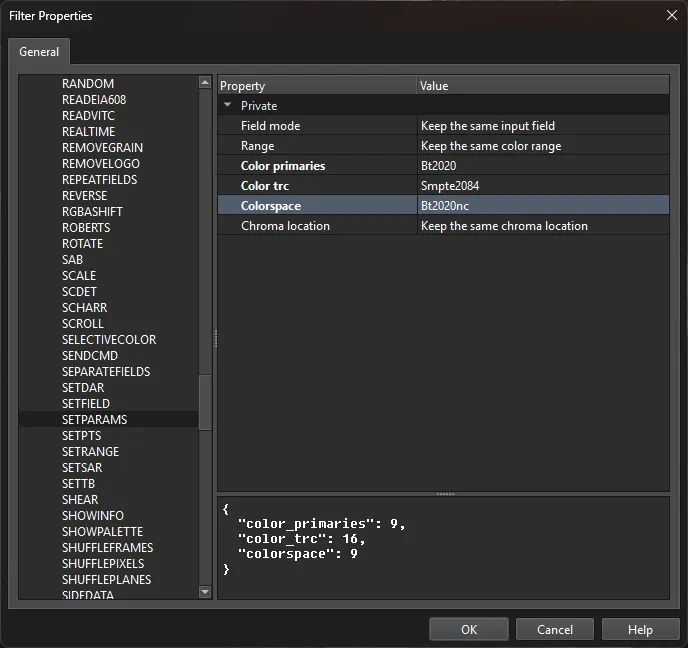
which would work with x265 but could also work with NVENC
Note, I currently have an old version of VoukoderPro installed because I only installed it to see what the UI was like at the time and don't have a subscription. I still mainly use classic voukoder myself. So it's possible some things may have changed.
I also see video encoder -> HDR on mine but I don't know what that is. Setting up the project in premiere correctly and either using the x265 settings alone or with the setparams filter should be enough to get a correct HDR output
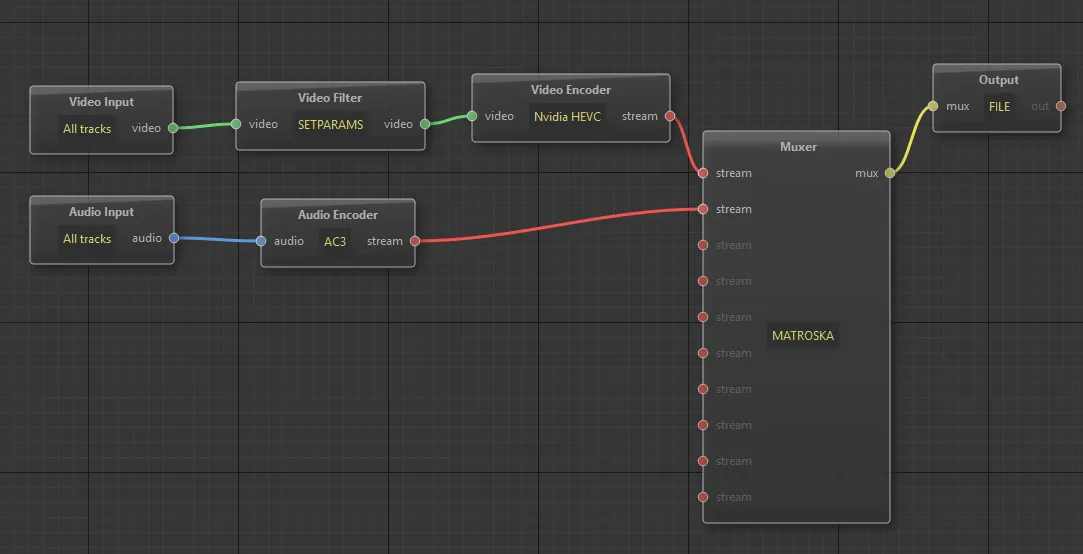
this is an example of how I would set up HDR encoding for NVENC using the above SETPARAMS filter. With the X265 settings you listed, you could skip the SETPARAMS node as well.
-
Thanks to Vouk I was able to test the newest version. It appears that the SETPARAMS filter I was talking about above is NOT working as I expected it to. For reference, this is the sort of thing that was working in classic Voukoder:
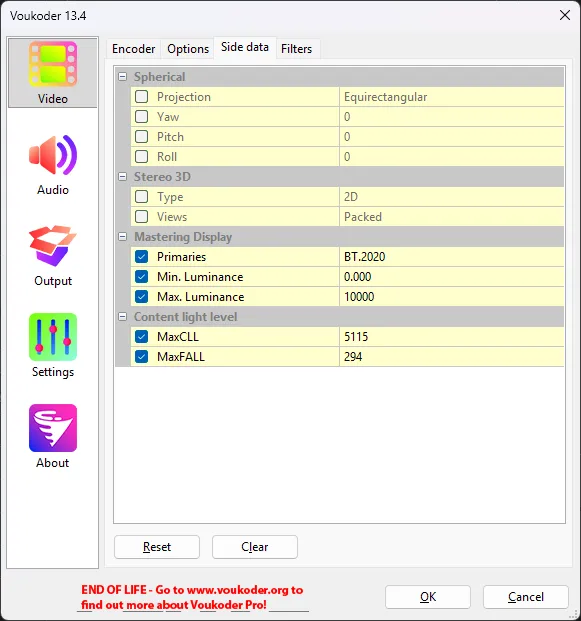
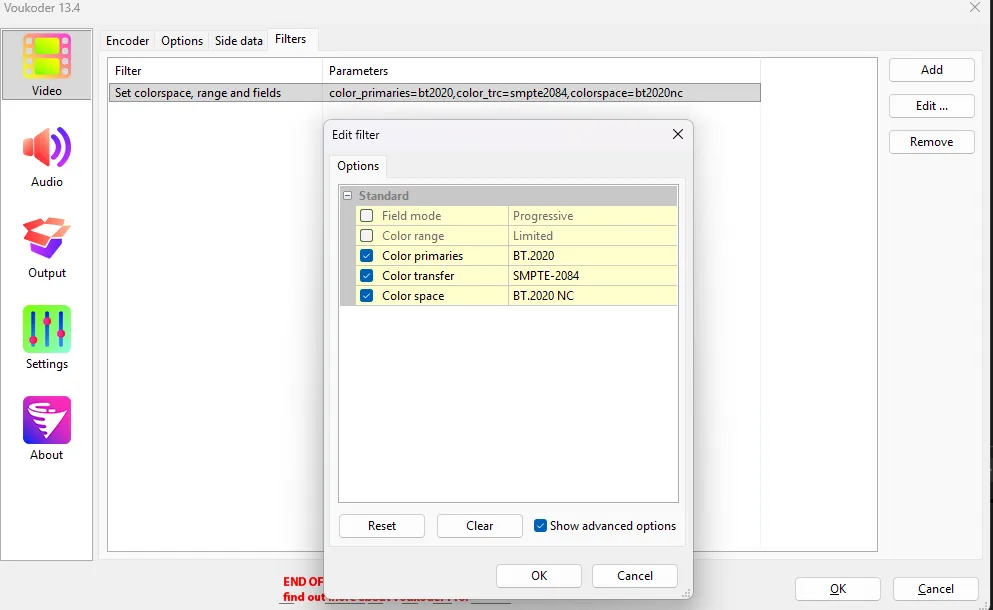
However, when I use SETPARAMS like the above screenshot and also put these in the HDR tab in the video encoder:
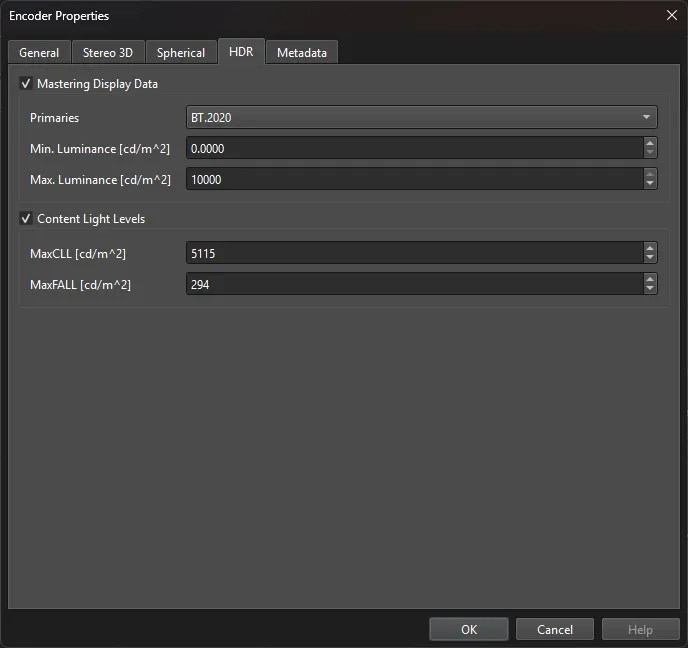
My exported test is NOT triggering HDR like the classic voukoder version of the same presets is.
Perhaps we need help from Vouk to help us understand how to recreate what classic voukoder was doing with the color_primaries=bt2020,color_trc=smpte2084,colorspace=bt2020nc
I was under the impression that setting SETPARAMS like this and feeding that into the encoder like this would do it:
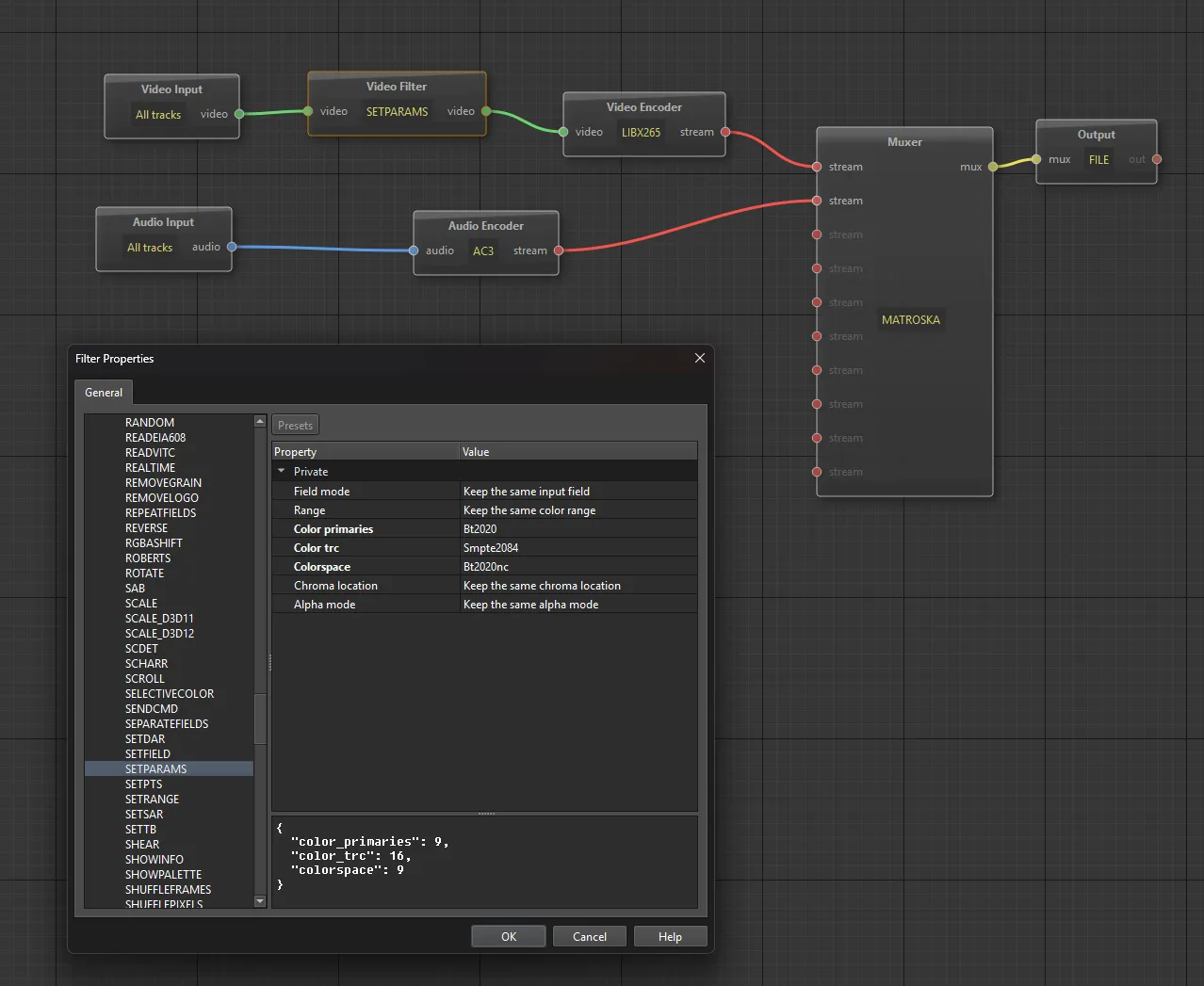
but something appears to be different because here's the output file, showing rec709 in mediainfo:
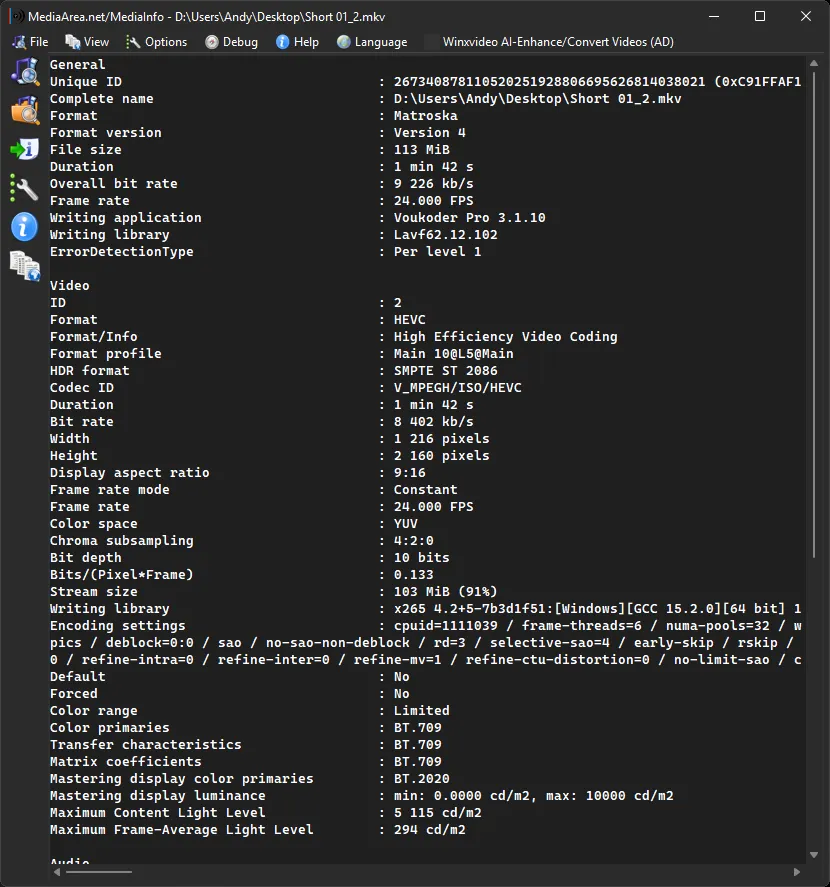
It does show the HDR metadata, but the "color primaries, transfer characteristics, and matrix coefficients" are still saying rec709
-
- Offizieller Beitrag
Can you try changing this setting in the INPUT node?
-

Can you try changing this setting in the INPUT node?
Ah, I wasn't aware there was an option there. That means one less node, but unfortunately, there is no difference when I do it that way. Still get rec709 in those 3 fields in mediainfo and the video doesn't play in HDR on my display either.
-
I looked in the log and I see this line which may be the issue:
2026-07-26 06:57:16 (debug) [InputNode.cpp:118] Filter config: buffer@a19ca589c5e040dd9bb7b130ab4f6836=width=1215:height=2160:pix_fmt=p010:time_base=1/24:pixel_aspect=1/1:range=1:colorspace=1,scale=in_color_matrix=bt709:out_color_matrix=bt709:in_range=tv:out_range=tv,format=pix_fmts=p010le,buffersink@31a149c3d21144df84b529ba436e12a8
in_color_matrix and out_color_matrix is showing bt709 despite what I set. colorspace=1 also appears to be ignoring what I set, and I don't see transfer function being represented there at all
-
- Offizieller Beitrag
It is designed like this:
The INPUT node selects how the format from the NLE should be interpreted as.
- Either it is set to AUTO then it will be taken as it is delivered by the NLE, you can overwrite to other values though. If i understand you correctly we want to have bt709 here.
Next is the filter chain:
- We feed the frames in the filter chain.
- In:
- in_color_matrix=bt709
- out_color_matrix=bt709
- in_range=tv
- Out:
- out_color_matrix=bt709 (We want to see an HDR format here, right?)
- Next we feed this frame with the HDR format to the encoder
Is that correct?
-
It is designed like this:
The INPUT node selects how the format from the NLE should be interpreted as.
- Either it is set to AUTO then it will be taken as it is delivered by the NLE, you can overwrite to other values though. If i understand you correctly we want to have bt709 here.
Next is the filter chain:
- We feed the frames in the filter chain.
- In:
- in_color_matrix=bt709
- out_color_matrix=bt709
- in_range=tv
- Out:
- out_color_matrix=bt709 (We want to see an HDR format here, right?)
- Next we feed this frame with the HDR format to the encoder
Is that correct?
No, we have to set things as rec709 in Premiere just so that premiere doesn't do an automatic color space downconversion of the source HDR values to SDR, since you've said you can't access the native HDR formats from Premiere. Premiere is telling voukoder that we're working with rec709/SDR, but we need to tell voukoder that's wrong and the data is actually HDR
We want to interpeet the input values to match the values I had in the old voukoder screenshot:
https://www.voukoder.org/file-download/1109/
I tried it with the input node, and I also tried it with SETPARAMS and SCALE filters and neither option worked to modify the input colorspace, primaries and transfer function.
The line from the log I posted above is what happened when I tried to set the HDR values in the input node. It seems to have ignored them.
-
No, we have to set things as rec709 in Premiere just so that premiere doesn't do an automatic color space downconversion of the source HDR values to SDR, since you've said you can't access the native HDR formats from Premiere.
Thank you very much for trying to figure it out. I tried going through the things you mention and did some more tests, and it it looks like the "brightened HDR" thing I mentioned above was a result of the automatic color space conversion you're talking about and not true HDR. When I looked at the MediaInfo data earlier, I focused on the "HDR format" field. But now I noticed looked further down and noticed that the Color Primaries and the rest are still BT.709. So it appears that I simply can't get real HDR transfer to work either and was simply tone mapping from HDR to SDR:
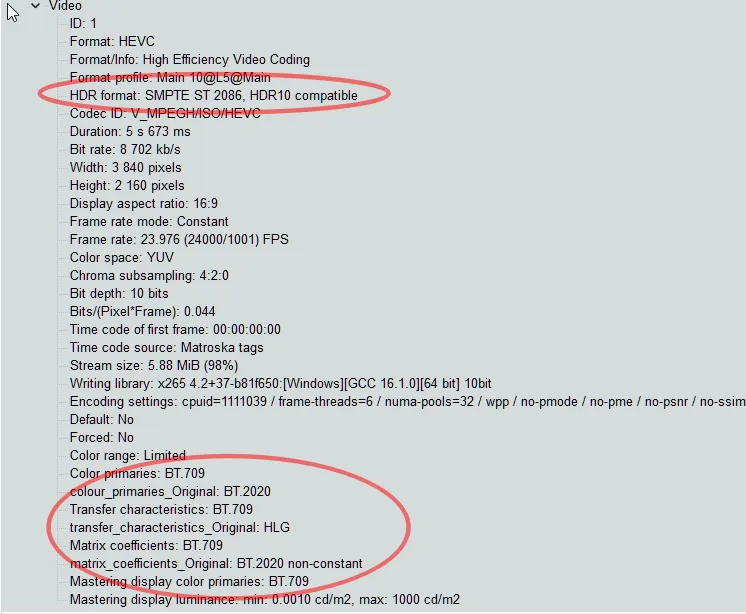
Also, the settings in Video Input→Colors don't seem affect the output. I tried setting all three values to BT.709 and then to BT.2020NC/SMPTE-2080. The MediaInfo values stayed exactly the same for both files. Really hoping somebody smarter and more knowledgeable than I am will figure this out.
-
- Offizieller Beitrag
Of course I will support you with this. I'll debug the entire workflow probably next weekend.
-
- Offizieller Beitrag
Would that help you? I have managed (with the help of KIRO) to select PQ and HLG HDR content directly from Premiere. No SETPARAMS filter necessary anymore!
I'm preparing builds right now ...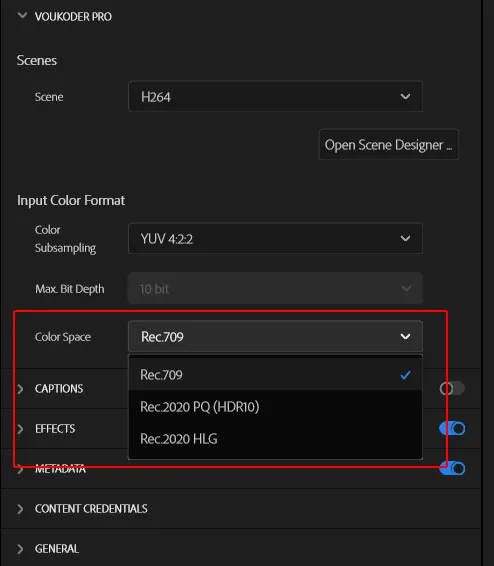
-
Would that help you? I have managed (with the help of KIRO) to select PQ and HLG HDR content directly from Premiere. No SETPARAMS filter necessary anymore!
I'm preparing builds right now ...
Seems like a good idea. I'll check it out when it's ready

-
- Offizieller Beitrag
Here you are.
Edit: Removed the download. Please use the official version 2026.1.12 instead.
-
Here you are.
Well, the output video is now correctly flagged as HDR, but it appears to be doing a rec709 -> PQ2020 conversion, as the colors are incorrect. In MediaInfo, we have the correct values, which means the output values are correct:

However, it does not appear to be interpreting the input values in those formats. So what appears to be happening is ffmpeg is seeing the rec709 video from premiere, interpreting it as rec709, and then doing a post-conversion to pq2020 HDR. Because we were only falsely flagging the source as rec709 to avoid a conversion in the first place, this is incorrect. It should take that source stream and re-interpret it as PQ, bt2020nc, bt2020 before being sent to the encoder
Here's an image taken with my phone to show the differences in colors (taking a screenshot of HDR doesn't work great). Here's what this video looked like when I encoded it with classic Voukoder:
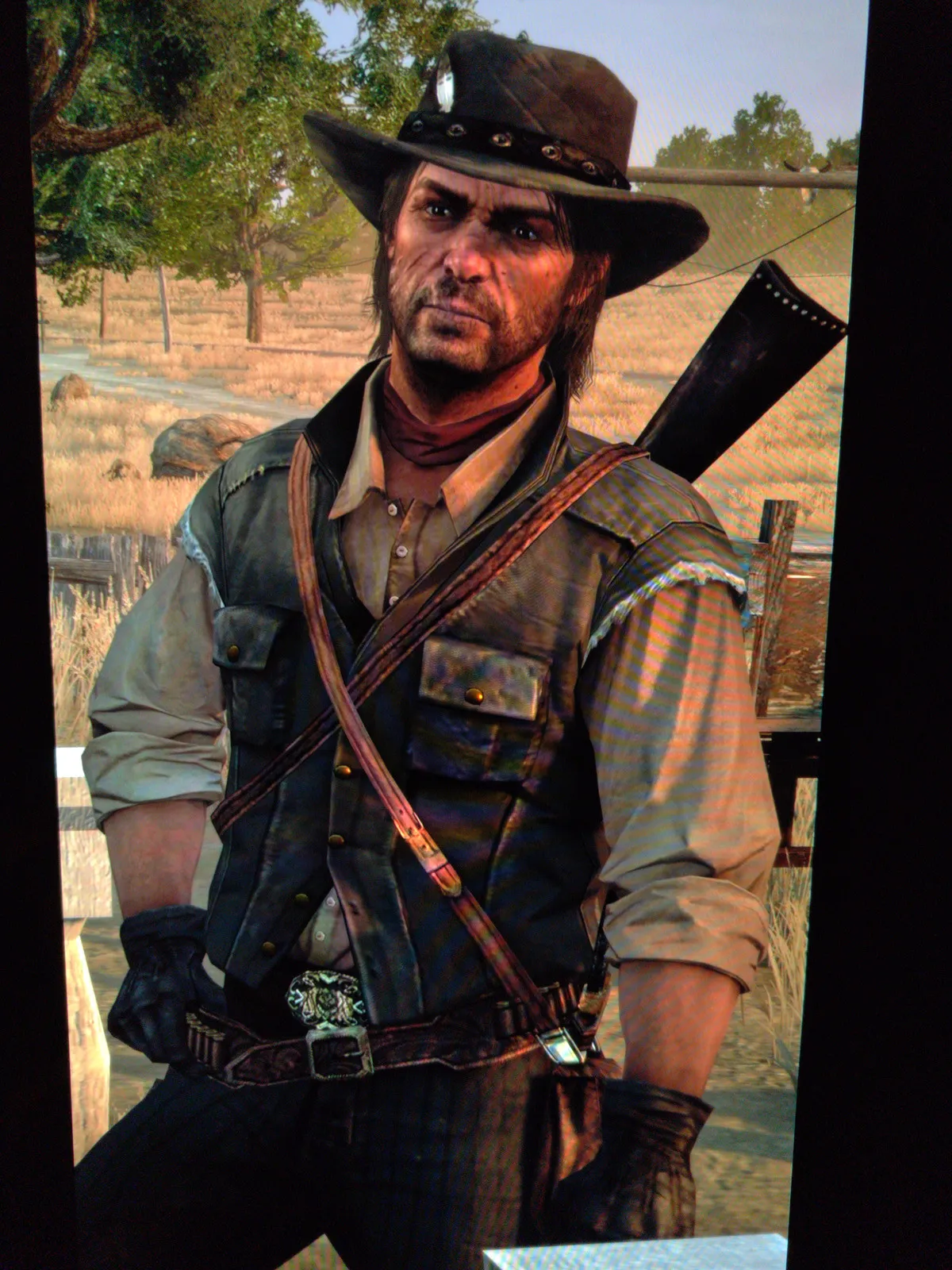
and here's what the same video looks like with that new version of voukoderPro:
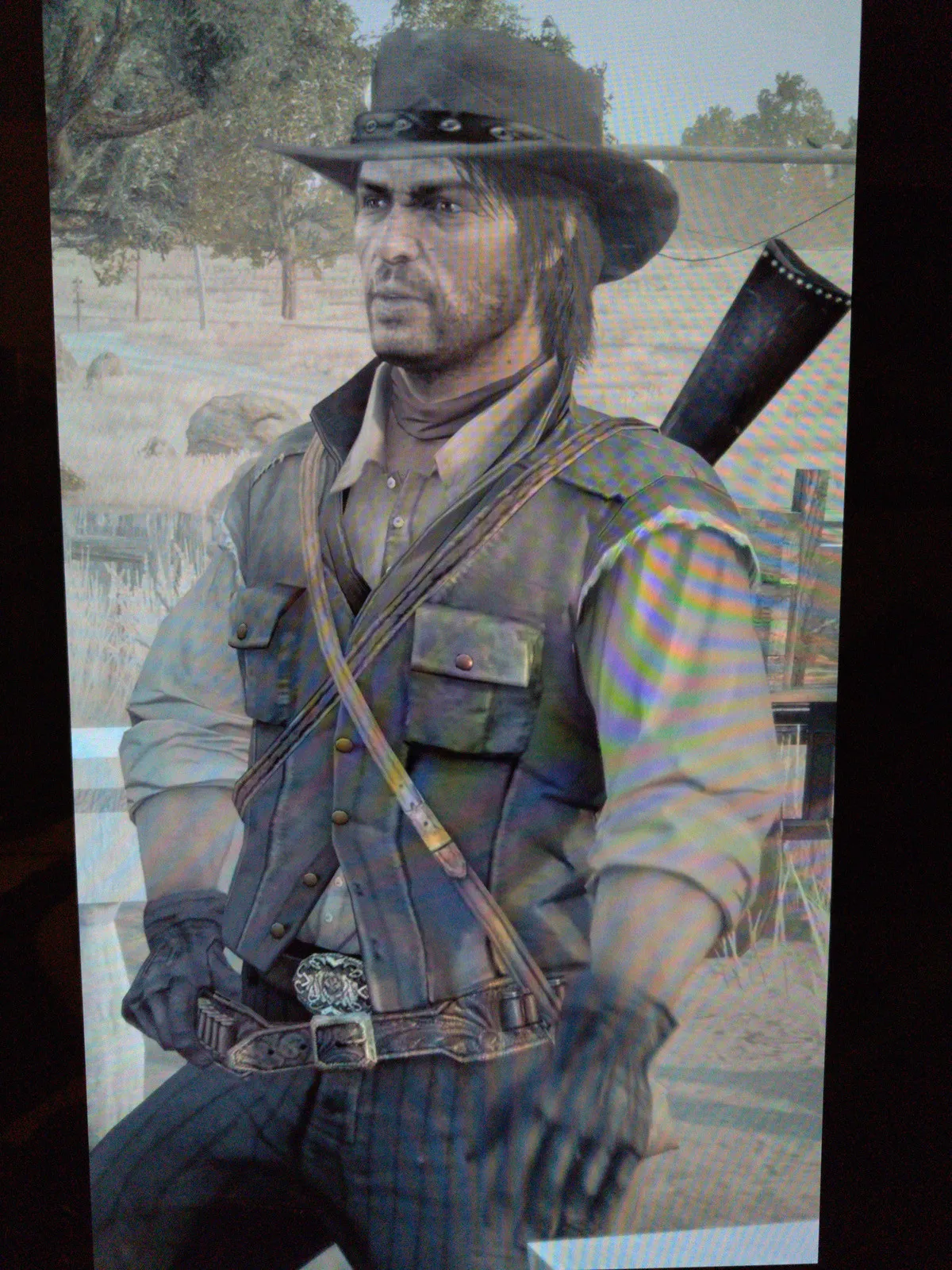
The bottom IS what it looks like in premiere when you interpret as rec709, but like I said, that's only being done so that the original RGB values are being passed through without any of premiere's built in color management. Without manually interpreting the video that way, premiere will do an automated conversion from HDR to SDR, and lose all the expanded highlight and color information, and making true HDR export impossible.
Of course, if Adobe had simply answered you on how to be able to make use of their native HDR color format support directly in the plugin, we wouldn't need these workarounds, but here we are.
-
- Offizieller Beitrag
The thing is: You don't have to mark it falsely as bt709.
Just create a real bt2020 (HDR) project and export it with that Voukoder Pro version. I did this with the "Bars and Tone" clip and it got exported just as it got displayed in the Adobe export preview. Can you check back?
Code
Alles anzeigenVideo ID : 1 Format : HEVC Format/Info : High Efficiency Video Coding Format profile : Main@L4@Main Codec ID : hev1 Codec ID/Info : High Efficiency Video Coding Duration : 5 s 0 ms Bit rate mode : Variable Bit rate : 580 kb/s Width : 1 920 pixels Height : 1 080 pixels Display aspect ratio : 16:9 Frame rate mode : Constant Frame rate : 25.000 FPS Color space : YUV Chroma subsampling : 4:2:0 Bit depth : 8 bits Scan type : Progressive Bits/(Pixel*Frame) : 0.011 Stream size : 354 KiB (83%) Writing library : x265 4.2+5-7b3d1f51:[Windows][GCC 15.2.0][64 bit] 8bit+10bit+12bit Encoding settings : cpuid=1111039 / frame-threads=5 / numa-pools=32 / wpp / no-pmode / no-pme / no-psnr / no-ssim / log-level=3 / input-csp=1 / input-res=1920x1080 / interlace=0 / total-frames=0 / level-idc=0 / high-tier=1 / uhd-bd=0 / ref=3 / no-allow-non-conformance / no-repeat-headers / annexb / no-aud / no-eob / no-eos / no-hrd / info / hash=0 / temporal-layers=0 / open-gop / min-keyint=1 / keyint=12 / gop-lookahead=0 / bframes=0 / b-adapt=2 / no-b-pyramid / bframe-bias=0 / rc-lookahead=20 / lookahead-slices=6 / scenecut=40 / no-hist-scenecut / radl=0 / no-splice / no-intra-refresh / ctu=64 / min-cu-size=8 / no-rect / no-amp / max-tu-size=32 / tu-inter-depth=1 / tu-intra-depth=1 / limit-tu=0 / rdoq-level=0 / dynamic-rd=0.00 / no-ssim-rd / signhide / no-tskip / nr-intra=0 / nr-inter=0 / no-constrained-intra / strong-intra-smoothing / max-merge=3 / limit-refs=1 / no-limit-modes / me=1 / subme=2 / merange=57 / temporal-mvp / no-frame-dup / no-hme / weightp / no-weightb / no-analyze-src-pics / deblock=0:0 / sao / no-sao-non-deblock / rd=3 / selective-sao=4 / early-skip / rskip / no-fast-intra / no-tskip-fast / no-cu-lossless / b-intra / no-splitrd-skip / rdpenalty=0 / psy-rd=2.00 / psy-rdoq=0.00 / no-rd-refine / no-lossless / cbqpoffs=0 / crqpoffs=0 / rc=crf / crf=28.0 / qcomp=0.60 / qpstep=4 / stats-write=0 / stats-read=0 / ipratio=1.40 / aq-mode=2 / aq-strength=1.00 / cutree / zone-count=0 / no-strict-cbr / qg-size=32 / no-rc-grain / qpmax=69 / qpmin=0 / no-const-vbv / sar=1 / overscan=0 / videoformat=5 / range=0 / colorprim=9 / transfer=16 / colormatrix=9 / chromaloc=0 / display-window=0 / cll=0,0 / min-luma=0 / max-luma=255 / log2-max-poc-lsb=8 / vui-timing-info / vui-hrd-info / slices=1 / no-opt-qp-pps / no-opt-ref-list-length-pps / no-multi-pass-opt-rps / scenecut-bias=0.05 / no-opt-cu-delta-qp / no-aq-motion / no-hdr10 / no-hdr10-opt / no-dhdr10-opt / no-idr-recovery-sei / analysis-reuse-level=0 / analysis-save-reuse-level=0 / analysis-load-reuse-level=0 / scale-factor=0 / refine-intra=0 / refine-inter=0 / refine-mv=1 / refine-ctu-distortion=0 / no-limit-sao / ctu-info=0 / no-lowpass-dct / refine-analysis-type=0 / copy-pic=1 / max-ausize-factor=1.0 / no-dynamic-refine / no-single-sei / no-hevc-aq / no-svt / no-field / qp-adaptation-range=1.00 / scenecut-aware-qp=0conformance-window-offsets / right=0 / bottom=0 / decoder-max-rate=0 / no-vbv-live-multi-pass / no-mcstf / no-alpha / no-sbrc / no-frame-rc Color range : Limited Color primaries : BT.2020 Transfer characteristics : PQ Matrix coefficients : BT.2020 non-constant Codec configuration box : hvcCTo me it looks like KIRO / AI has figured out what Adobe didn't want to tell me.
P.S.: I'm usually working on my development system over remote access and I doubt HDR is mapped correctly there. I also don't have an HDR capable PC monitor screen.
-
The thing is: You don't have to mark it falsely as bt709.
Just create a real bt2020 (HDR) project and export it with that Voukoder Pro version. I did this with the "Bars and Tone" clip and it got exported just as it got displayed in the Adobe export preview. Can you check back?
Code
Alles anzeigenVideo ID : 1 Format : HEVC Format/Info : High Efficiency Video Coding Format profile : Main@L4@Main Codec ID : hev1 Codec ID/Info : High Efficiency Video Coding Duration : 5 s 0 ms Bit rate mode : Variable Bit rate : 580 kb/s Width : 1 920 pixels Height : 1 080 pixels Display aspect ratio : 16:9 Frame rate mode : Constant Frame rate : 25.000 FPS Color space : YUV Chroma subsampling : 4:2:0 Bit depth : 8 bits Scan type : Progressive Bits/(Pixel*Frame) : 0.011 Stream size : 354 KiB (83%) Writing library : x265 4.2+5-7b3d1f51:[Windows][GCC 15.2.0][64 bit] 8bit+10bit+12bit Encoding settings : cpuid=1111039 / frame-threads=5 / numa-pools=32 / wpp / no-pmode / no-pme / no-psnr / no-ssim / log-level=3 / input-csp=1 / input-res=1920x1080 / interlace=0 / total-frames=0 / level-idc=0 / high-tier=1 / uhd-bd=0 / ref=3 / no-allow-non-conformance / no-repeat-headers / annexb / no-aud / no-eob / no-eos / no-hrd / info / hash=0 / temporal-layers=0 / open-gop / min-keyint=1 / keyint=12 / gop-lookahead=0 / bframes=0 / b-adapt=2 / no-b-pyramid / bframe-bias=0 / rc-lookahead=20 / lookahead-slices=6 / scenecut=40 / no-hist-scenecut / radl=0 / no-splice / no-intra-refresh / ctu=64 / min-cu-size=8 / no-rect / no-amp / max-tu-size=32 / tu-inter-depth=1 / tu-intra-depth=1 / limit-tu=0 / rdoq-level=0 / dynamic-rd=0.00 / no-ssim-rd / signhide / no-tskip / nr-intra=0 / nr-inter=0 / no-constrained-intra / strong-intra-smoothing / max-merge=3 / limit-refs=1 / no-limit-modes / me=1 / subme=2 / merange=57 / temporal-mvp / no-frame-dup / no-hme / weightp / no-weightb / no-analyze-src-pics / deblock=0:0 / sao / no-sao-non-deblock / rd=3 / selective-sao=4 / early-skip / rskip / no-fast-intra / no-tskip-fast / no-cu-lossless / b-intra / no-splitrd-skip / rdpenalty=0 / psy-rd=2.00 / psy-rdoq=0.00 / no-rd-refine / no-lossless / cbqpoffs=0 / crqpoffs=0 / rc=crf / crf=28.0 / qcomp=0.60 / qpstep=4 / stats-write=0 / stats-read=0 / ipratio=1.40 / aq-mode=2 / aq-strength=1.00 / cutree / zone-count=0 / no-strict-cbr / qg-size=32 / no-rc-grain / qpmax=69 / qpmin=0 / no-const-vbv / sar=1 / overscan=0 / videoformat=5 / range=0 / colorprim=9 / transfer=16 / colormatrix=9 / chromaloc=0 / display-window=0 / cll=0,0 / min-luma=0 / max-luma=255 / log2-max-poc-lsb=8 / vui-timing-info / vui-hrd-info / slices=1 / no-opt-qp-pps / no-opt-ref-list-length-pps / no-multi-pass-opt-rps / scenecut-bias=0.05 / no-opt-cu-delta-qp / no-aq-motion / no-hdr10 / no-hdr10-opt / no-dhdr10-opt / no-idr-recovery-sei / analysis-reuse-level=0 / analysis-save-reuse-level=0 / analysis-load-reuse-level=0 / scale-factor=0 / refine-intra=0 / refine-inter=0 / refine-mv=1 / refine-ctu-distortion=0 / no-limit-sao / ctu-info=0 / no-lowpass-dct / refine-analysis-type=0 / copy-pic=1 / max-ausize-factor=1.0 / no-dynamic-refine / no-single-sei / no-hevc-aq / no-svt / no-field / qp-adaptation-range=1.00 / scenecut-aware-qp=0conformance-window-offsets / right=0 / bottom=0 / decoder-max-rate=0 / no-vbv-live-multi-pass / no-mcstf / no-alpha / no-sbrc / no-frame-rc Color range : Limited Color primaries : BT.2020 Transfer characteristics : PQ Matrix coefficients : BT.2020 non-constant Codec configuration box : hvcCTo me it looks like KIRO / AI has figured out what Adobe didn't want to tell me.
P.S.: I'm usually working on my development system over remote access and I doubt HDR is mapped correctly there. I also don't have an HDR capable PC monitor screen.
Oh interesting, I wasn't aware you were able to incorporate the native HDR system. I'll test that out now. If this works this is definitely the much preferred way to do it.
Testing... and confirmed! It looks perfect!
Okay, so this significantly streamlines our workflow now (and basically makes this thread obsolete). Just make an HDR project, export to VoukoderPro with the Rec. 2020 PQ (HDR10) or Rec.2020 HLG options, depending on your footage/sequence, and then apply your standard encoding nodes. Optionally, use the HDR tab in your chosen video encoder to provide MaxCLL/MaxFALL metadata if you have it (I personally analyze my footage to get it as part of my grading process).
As for encoding settings, I personally use around CRF 12 for x265 and CQP 12 for NVENC HEVC. I can't speak for other encoders, but just note that these values are in relation to an 18 for SDR, so you need a higher quality encoding setting to get a fairly equivalent picture quality in HDR.
As an aside, do you think it's possible to incorporate adding external file attachments to the Matroska muxer at all? I use that for youtube's 3D LUT-guided HDR-to-SDR tonemapping system. At the moment I need to re-mux after I've finished with voukoder to attach my LUT. Not the end of the world just time consuming for large files and it would be nice if that was part of the node system. -
- Offizieller Beitrag
As an aside, do you think it's possible to incorporate adding external file attachments to the Matroska muxer at all? I use that for youtube's 3D LUT-guided HDR-to-SDR tonemapping system. At the moment I need to re-mux after I've finished with voukoder to attach my LUT. Not the end of the world just time consuming for large files and it would be nice if that was part of the node system.
Yes, it should be possible. But I need to read into it.
-
Oh interesting, I wasn't aware you were able to incorporate the native HDR system. I'll test that out now. If this works this is definitely the much preferred way to do it.
Testing... and confirmed! It looks perfect!
Okay, so this significantly streamlines our workflow now (and basically makes this thread obsolete). Just make an HDR project, export to VoukoderPro with the Rec. 2020 PQ (HDR10) or Rec.2020 HLG options, depending on your footage/sequence, and then apply your standard encoding nodes. Optionally, use the HDR tab in your chosen video encoder to provide MaxCLL/MaxFALL metadata if you have it (I personally analyze my footage to get it as part of my grading process).Thanks for this. Did you double-check that it's true HDR, with all the HDR metadata present, and not a similarly-looking conversion? I'll try to find time to run some tests of my own tomorrow. Very excited to see HDR working again.
EDIT: tried running a couple of quick tests on the file I linked earlier before going to bed, no luck achieving the correct results with this. The closest one still looked like a conversion. Didn't have time to check metadata or even MediaInfo. Will try again tomorrow. In the meantime, could I please bother you with giving this particular video a test run and confirming that the encoded result has HDR and works on your end? What settings need to be changed on a clean new file import, apart from setting Color Space Rec 2020 on the Export tab and "colorprim=bt2020:transfer=arib-std-b67:colormatrix=bt2020nc" in the encoder?
-
Thanks for this. Did you double-check that it's true HDR, with all the HDR metadata present, and not a similarly-looking conversion? I'll try to find time to run some tests of my own tomorrow. Very excited to see HDR working again.
EDIT: tried running a couple of quick tests on the file I linked earlier before going to bed, no luck achieving the correct results with this. The closest one still looked like a conversion. Didn't have time to check metadata or even MediaInfo. Will try again tomorrow. In the meantime, could I please bother you with giving this particular video a test run and confirming that the encoded result has HDR and works on your end? What settings need to be changed on a clean new file import, apart from setting Color Space Rec 2020 on the Export tab and "colorprim=bt2020:transfer=arib-std-b67:colormatrix=bt2020nc" in the encoder?
Yes it's proper HDR, no conversion, and proper metadata.
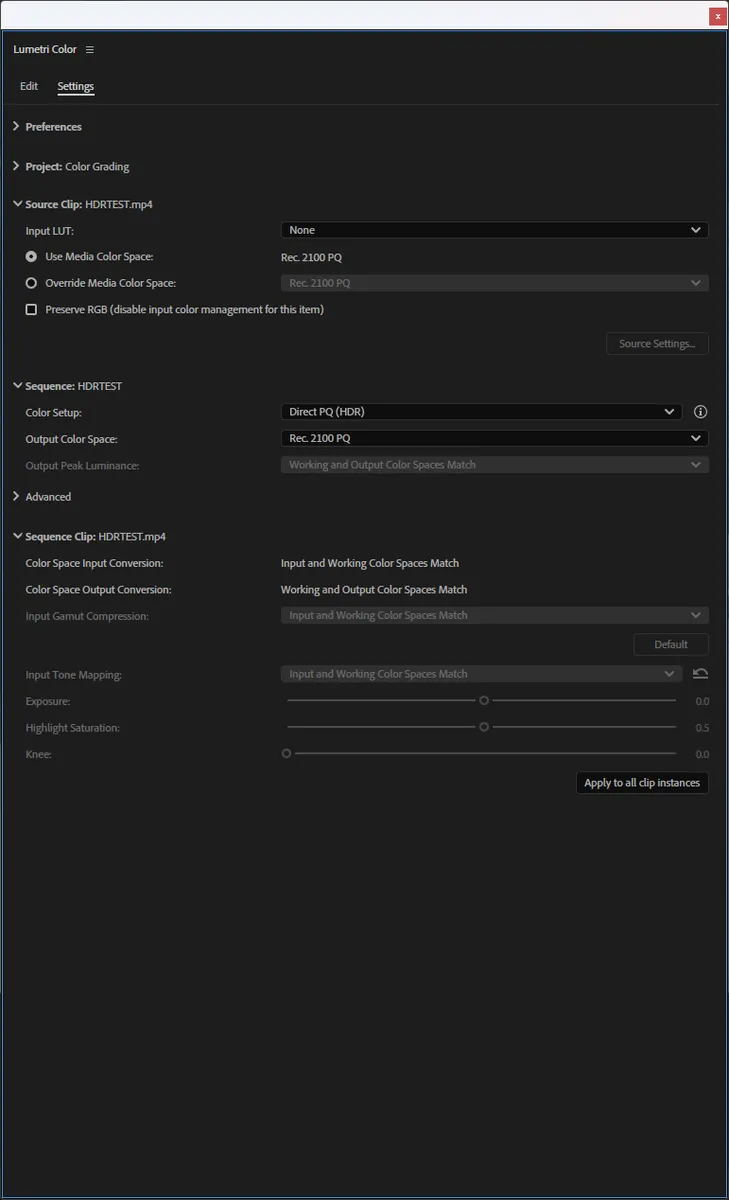
As for your source file, I had to do a remux as premiere wouldn't even accept it as is. Looks like it was a renamed MKV file. After remuxing, I imported it and you need to make sure the clip and sequence are set like this:
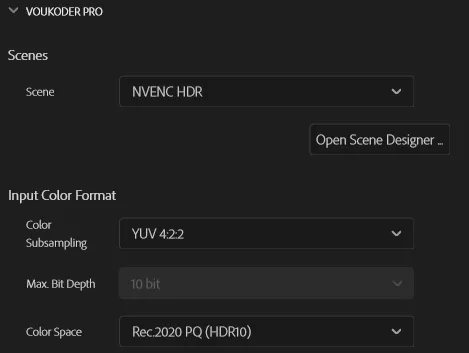
Then in export set it up like this:
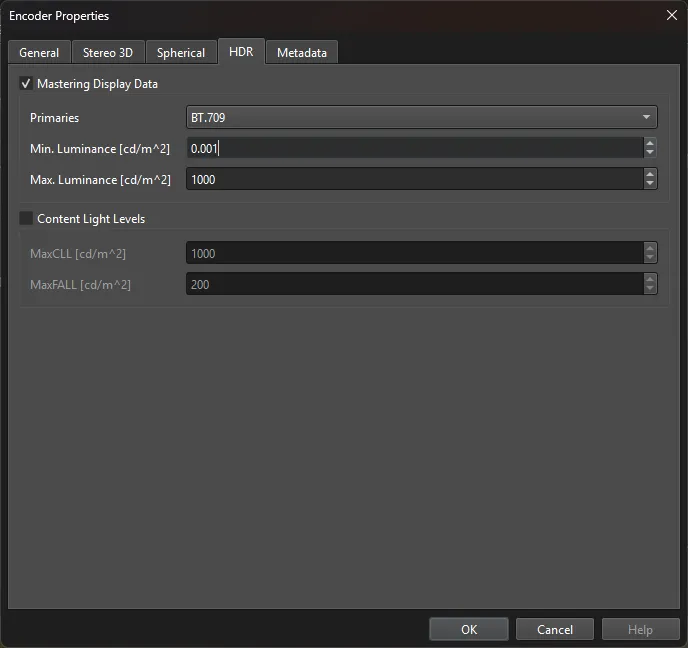
In the video encoder node you'll want to add your HDR metadata: (these are the values from your source clip)
I think I did find a bug though. If you set up the exporter with 4:2:0 like this:
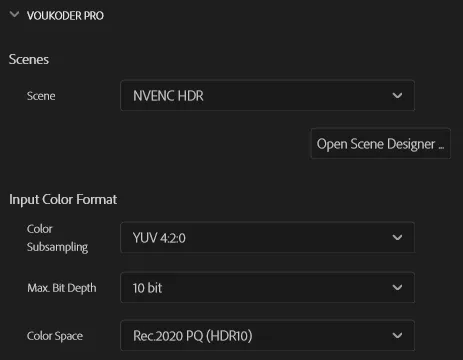
It won't work. Only 4:2:2 worked for me. I used that since my footage is already 4:2:2 anyway, but I didn't realize the 4:2:0 option wasn't working correctly until just now.
Also, you shouldn't need this now:
Zitat"colorprim=bt2020:transfer=arib-std-b67:colormatrix=bt2020nc" in the encoder
-
