Input node color space settings do nothing (tested in Premiere)

  • Tested with 3.2.2 and Premiere 26.2.2

    We discussed this a bit a few months ago in the old HDR guide thread, but ultimately I moved past it because we were able to get Premiere's native HDR support working in VoukoderPro which solved the main issue I was having at the time, but it's still a bug that the color space, primaries, and transfer function settings in the input node don't seem to have any effect whatsoever:
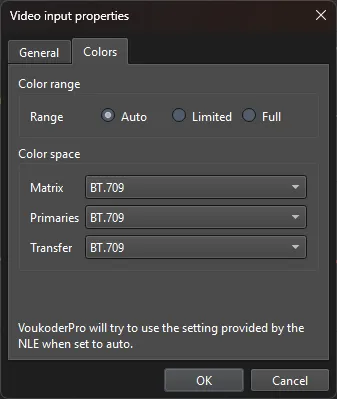
    While most people would never need this, those settings should be there to fix an issue when the editor potentially sends the wrong metadata about those aspects of the video. Note: I have also tried to accomplish this with both the SETPARAMS and SCALE video filters, and it seems to ignore the values there as well. In all cases, it's outputting whatever the editor is flagging the video as.

    The only way I can accomplish this is if the ENCODER itself has a way to flag these values, which for example is the case with x265, but as far as I can tell, this isn't possible with NVENC or most encoders. EDIT: x265 will work doing this, but if you select MKV, it will add the original colorspace flags to the container as well, although these can be stripped with mkvmerge header editor


    I personally have one specific use case as well where I'd like to make use of this. If I've edited in HDR, but I have a LUT that performs an SDR color grade based on the HDR code values, then technically, once I've applied my LUT, the values being outputted are actually representative of rec709 SDR values, even though Premiere would still be transmitting the HDR metadata. If I could apply my LUT, and then tell VoukoderPro to treat the incoming signal as SDR without having Premiere do any of its automatic color conversions, then I could very easily export the SDR version of my HDR edits with any encoder, without needing to re-interpret all of my footage and create an SDR timeline to handle that. This is especially important if I've made use of specific HDR compositing in my edit.

    Just in case you ask, no you can't simply set the connector to rec709, because doing so will cause Premiere to make its own HDR-to-SDR color conversions, which would be incompatible with the already LUT-converted values. I specifically want to take what the editor is sending VoukoderPro, and tell it that no, those reported input formats are incorrect, and tell it the ones I want to use instead.

    • Offizieller Beitrag

    While most people would never need this, those settings should be there to fix an issue when the editor potentially sends the wrong metadata about those aspects of the video.

    Yes, it is actually exactly there for this case. It allows you to change the color space info that gets sent from the host nle to voukoder. But just, this won't get used in most cases.

    But ... can you ask again in a small, simple sentence what you want me to change? :D

  • Yes, it is actually exactly there for this case. It allows you to change the color space info that gets sent from the host nle to voukoder. But just, this won't get used in most cases.

    But ... can you ask again in a small, simple sentence what you want me to change? :D

    Expected: setting matrix, primaries, and transfer in the input node changes how ffmpeg interprets the video signal, which then permeates to the encoder and container (when relevant). The output file when examined in MediaInfo then has these values displayed.

    Result: No matter what I set here, it's entirely ignored. The input color matrix, primaries, and transfer are always used exactly as sent to VoukoderPro from premiere.

    • Offizieller Beitrag

    I thought about this just now ...

    Actually the "Input" node is actually responsible on what gets fed in from the NLE to Voukoder Pro and how Voukoder Pro should interpret this input. So it is actually correct.

    What gets rendered by Voukoder Pro is actually more set in the encoder node

    Does this help you?

  • That metadata doesn't cover what I need. I need all 3: primaries, transfer function, and matrix

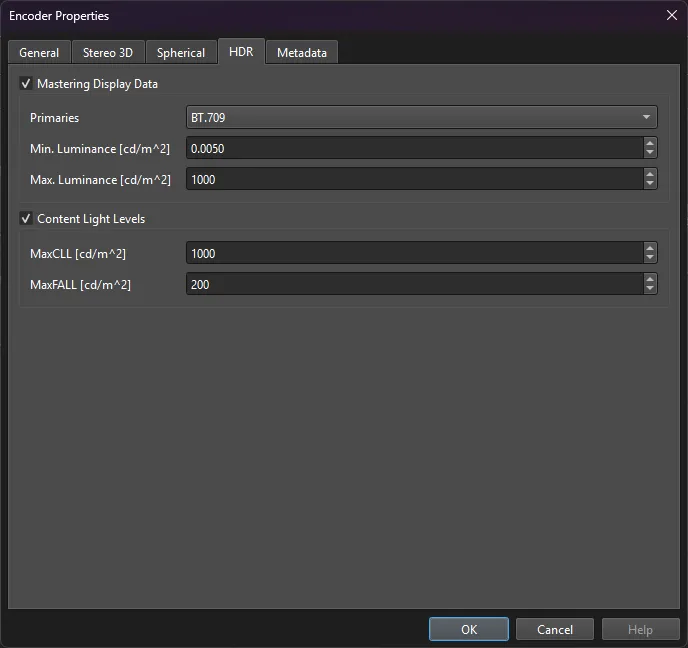
    That page only applies the HDR metadata. It can replace the primaries, but not the other values.

    The input node has a place to set the value for primaries, transfer, and matrix. It should be overriding what the NLE sent it. It's only supposed to use the NLE values if set to auto. If setting these values changes nothing, what's the point of that tab in the input node?

    As I said, the same problem is present if I attempt to manually change them with a video filter such as SCALE or SETPARAMS. It totally ignores what I put for primaries, matrix, and transfer in those nodes as well.

    It seems as if you're overriding or ignoring what the user is selecting in these cases, which shouldn't happen.


    It should be like this

    1. The NLE provides you values for transfer, primaries, matrix
    2. If the user keeps the input node's color tab set to auto, use those values. If the user changes from auto to something else, use those instead. This shouldn't be performing a conversion, just changing input metadata.
    3. If the user sets any of these properties in SCALE (In color matrix, In transfer, In primaries) replace them with what the user set there. They can also set output values for these in SCALE or SETPARAMS if they optionally want to perform a color space conversion. This should also be respected for those who wish to perform such a conversion.
    4. Then, if the user wants to add HDR metadata in the encoder node, they can do that as well.