1. Voukoder Pro
  2. Forum
    1. Unresolved Threads
  3. Documentation
  4. Downloads
  5. License
    1. Buy "Perpetual License for Voukoder Pro 2.x"
    2. Manage Account / License(s)
  • Login
  • Register
  • Search
This Thread
  • Everywhere
  • This Thread
  • This Forum
  • Pages
  • Forum
  • More Options
  1. Voukoder Pro
  2. Forum
  3. Announcements
  4. Latest news and updates

Upcoming changes

  • Vouk
  • December 3, 2024 at 4:45 PM
  • Vouk
    Administrator
    Reactions Received
    611
    Posts
    3,010
    • January 2, 2025 at 11:18 AM
    • Official Post
    • #21
    Quote from dokta_ALK

    Unfortunately, this code doesn' t work.

    Fixed this!

    • Previous Official Post
    • Next Official Post
  • dokta_ALK
    Beginner
    Reactions Received
    1
    Posts
    7
    • January 2, 2025 at 11:42 AM
    • #22
    Quote from Vouk

    Fixed this!

    Unfortunately it still doesn't work.

  • Vouk
    Administrator
    Reactions Received
    611
    Posts
    3,010
    • January 2, 2025 at 12:34 PM
    • Official Post
    • #23

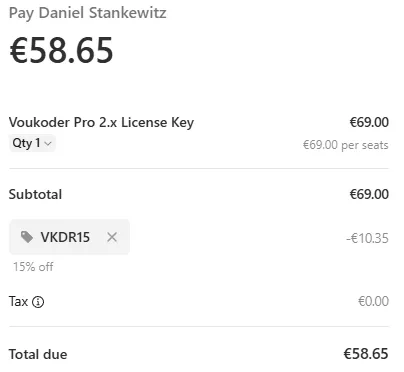
    Hm, works on my side ...

    Did you enter it like this?
    • Previous Official Post
    • Next Official Post
  • Vouk
    Administrator
    Reactions Received
    611
    Posts
    3,010
    • January 2, 2025 at 12:53 PM
    • Official Post
    • #24
    Quote from Joe24

    "By confirming your payment, you allow Daniel Stankewitz to charge you for this payment and future payments in accordance with their terms."

    Uh... no. Each and every future payment is going to be individually authorized by me.

    This has also been fixed.

    • Previous Official Post
    • Next Official Post
  • dokta_ALK
    Beginner
    Reactions Received
    1
    Posts
    7
    • January 2, 2025 at 1:02 PM
    • #25

    Now it has worked fine.

    Thank you.

  • Vouk
    Administrator
    Reactions Received
    611
    Posts
    3,010
    • January 2, 2025 at 1:05 PM
    • Official Post
    • #26

    Great! Don't hesitate to tell me if anything doesn't look right.

    • Previous Official Post
    • Next Official Post
  • Robert Niessner
    Beginner
    Reactions Received
    10
    Posts
    24
    • January 8, 2025 at 1:57 AM
    • #27

    Bought a license now. :)
    Will have a look as soon as I find some time and give some feedback.
    Great that there is now a MacOS version too.

  • backlight
    Beginner
    Reactions Received
    2
    Posts
    19
    • January 9, 2025 at 2:34 PM
    • #28

    i have purchased 3 licenses... but i cannot find how to load it into software!

  • Vouk
    Administrator
    Reactions Received
    611
    Posts
    3,010
    • January 9, 2025 at 3:53 PM
    • Official Post
    • #29

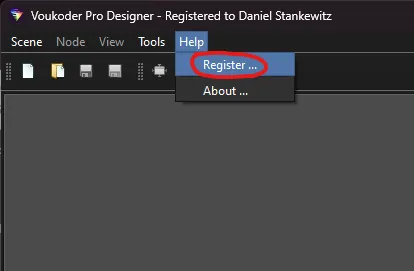
    Open the "Designer" app and click in the menu on "Help" > "Register ..." and paste your license key there.

    • Previous Official Post
    • Next Official Post
  • backlight
    Beginner
    Reactions Received
    2
    Posts
    19
    • January 13, 2025 at 10:57 AM
    • #30
    Quote from Vouk

    Open the "Designer" app and click in the menu on "Help" > "Register ..." and paste your license key there.

    i don't have that option

  • Vouk
    Administrator
    Reactions Received
    611
    Posts
    3,010
    • January 13, 2025 at 1:22 PM
    • Official Post
    • #31

    You really can't see this menu?

    What Voukoder Pro version are you using?

    • Previous Official Post
  1. Privacy Policy
  2. Legal Notice
Powered by WoltLab Suite™ 6.1.14