Output size discrepancy with FFmpeg and SVT-AV1 VBR issues

  • Hey Vouk. I got a couple issues and questions I'd like to report.

    First, I noticed that there are serious file size differences between encoding with Voukoder vs FFMpeg. For example, I'm doing SVT-AV1 VBR tests now. If I run this simplified FFMPEG command, for example:
    ffmpeg -i "TEST.mkv" -c:v libsvtav1  -pix_fmt yuv420p10le -preset 4 -svtav1-params rc=1:tbr=1000 -c:a copy "OUT_FFMPEG.mkv"

    versus having a Voukoder preset with VIdeo Input all on AUTO and Video Encoder on with identical settings:
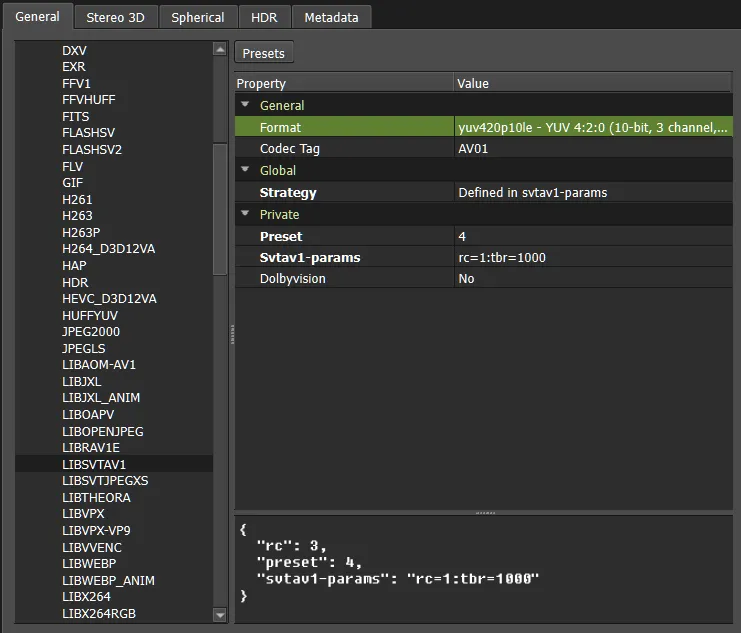

       
    I get completely different outputs with Transcoder. Sometimes much smaller, sometimes much larger, depending on the test file. Are there some defaults that are getting changed that are not seen through Voukoder's GUI? Theoretically, the file sizes should be more or less the same when encoded on the same settings, except maybe for a few kilobytes of metadata, no? In any case, I remembered that MKVToolNix GUI has a very useful option to show the full command line it's using to run MKVmerge. Maybe it would be a good idea to implement something similar to Voukoder for FFMpeg, both for testing and practical uses. Exposing any changed/passed values (if any) without going through the trace log would be great too.


    Second, it looks like there is a bug with the Variable Bitrate strategy for LIBSVTAV1. Changing Bitrate and Max Bitrate doesn't change the file size. I tried using 1,000 and 12,000 values and 10,000 and 20,000 values, and the file size stayed the same. Exported through both Premiere Pro and Transcoder.
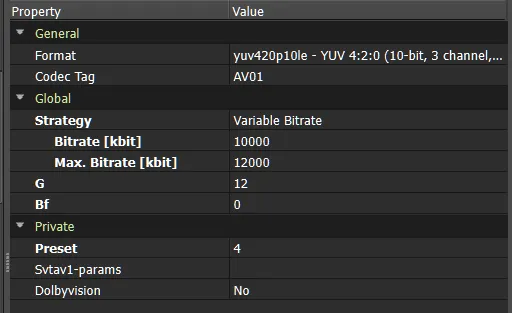
    In order to solve this, I switched back to the "Defined in svtav1-params" strategy. It finally started working, but found a new, very weird problem.
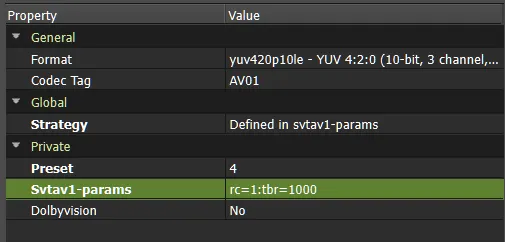
    First, I ran these VBR tests on higher presets (5-9) without any issues. But when I switched to Preset 4 or 3, the job couldn't finish. It always got stuck on ~66-84% (depending on the test file) without any errors in the trace log. I then tried different test files and removing every other other svtav1-params except "rc=1:tbr=1000". Absolutely nothing worked. The job wouldn't finish.

    I always gave up, thinking it was an SVT-AV1 VBR issue, but then decided to encode with the same settings in FFMPEG. The encode ran fine. Encouraged, I then tried Transcoder and the same scene. It also ran fine (though with a vastly different file size from FFMPEG's). Tried Premiere Pro/Media Encoder again – same issue. So the problem only persists when exporting through Premiere Pro on presets 4 and lower. I tried changing various Premiere settings, increasing tbr (bitrate) massively, and so on – nothing worked. Again, encoding with Presets 5 through 9 worked fine in all cases without any problems. Not sure it's something you can solve, but since it could be a Voukoder-related bug, I'm still reporting it.


    Lastly, a heads up: a new major version of FFMPEG (9.0.2) has been out for a while and their major version DLL updates are not backward compatible. I had to get an older 8.1.2 version to grab avcodec-62.dll and few other older DLLs from there. Hope any this is helpful. Thanks.
  • Important update:

    Never mind the Premiere issue in the last paragraph, with presets 4 and below. I switched back to my regular settings that used to work just fine on preset 4 (within the same scene) and the job still stopped around 84%. I recreated the exact same settings on a new scene and it started working fine again. So there must have been some kind of a bug or corruption with the saved scene, but I don't know what exactly caused it and can't reproduce it.

  • Just ran a series of tests with the new build. The "Target Bitrate" field now works. The encode size for 1,000 kbps, for example, is much lower than for 2,000 kbps.

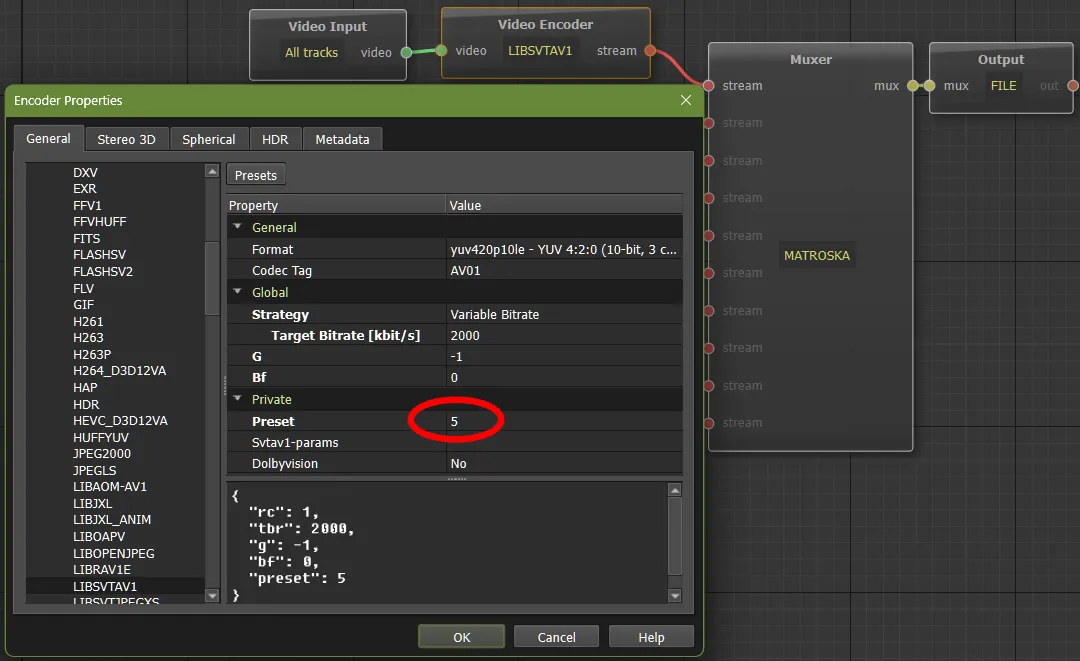
    However, I'm sorry to be the bearer of bad news. That Premiere Pro bug I mentioned earlier and prematurely dismissed without additional testing is still actually there. Today, I created a fresh new scenes.json and tested more thoroughly with a new scene. Preset 5 finishes just fine:

    Preset 4 hangs mid-job without an error. Literally the only difference is the lower preset value. Doesn't matter if I run through the "Variable Bitrate" strategy or through "Defined in svtav1-params" with "rc=1:tbr=2000". I even tried raising the bitrate to 10,000. Same problem: presets 5+ work even on very low bitrates, and presets 3-4 bug out.

    The last log entry is just this:

    Code
    (trace)    [FFmpeg:0] filter context - w: 1920 h: 1080 fmt: 64 csp: bt709 range: tv alpha: unspecified, incoming frame - w: 1920 h: 1080 fmt: 64 csp: unknown range: unknown alpha: unspecified pts_time: 7.966667

    Same messages that I saw in the log with Preset 5, and there are no errors. The incomplete output file is locked by by Media Encoder, even if when stop the job, as if the job became unresponsive instead of generating a proper error. The only way to unlock it is to exit Media Encoder. I don't have Vegas or DaVinci Resolve, otherwise I'd test there to see if the problem goes beyond Adobe, but I did try encoding the same source with the same scene in Transcoder again, using presets 3 and 4, and it finished just fine. So it seems like the problem is either the Premiere Pro Voukoder plugin or some half-assed way Premiere exports their streams.

    If that sounds annoying, I – sorry! – found another issue/bug today. Since VBR wasn't fully working in Adobe, I tested using the "--mbr" variable with CRF encodes instead (to cap excessive and unpredictable bitrate usage). All went seemingly perfect in Transkoder, actually making it my preferred choice over VBR by far, but when I switched to Premiere and ran the tests there... Well, take a look at the encode:

    Filebin | 685nmjj8g2dn9paz

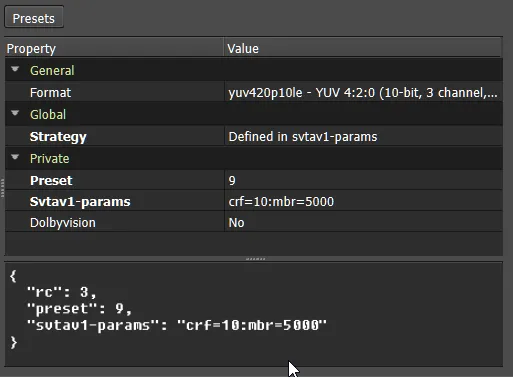
    This encode was done with a very basic "crf=10:mbr=5000" version of svtav1-params:

    You need to use lower --mbr for this one to consistently reproduce. If you raise it high enough, the effect will become less pronounced until you'll just end up with the same file size as if you didn't use it. But the thing is, it worked properly in Transcoder (I even tried ridiculous "crf=5:mbr=500" to make sure), so it's only Adobe's output that has massive visual bugs like that. Could you please take a professional look? Thank you.

    • Offizieller Beitrag

    The thing is: I don't work with the encoder parameters myself. But I know (at least from x264/5) the preset values en-/disables a whole set of encoder features. In Voukoder Pro I just make sure everything is being set to correct value in that each specific NLE.

    The "Private" properties in the Designer are btw auto-detected from FFmpeg, I just have to add the global properties manually.

    So if you are not happy with the results of some values, you better don't use then, or use better values. :saint:

  • From what I see, it's not an encoder parameter issue but some kind of a Premiere plugin bug. Again, these parameters and values work perfectly fine both in FFmpeg and Transcoder. The only thing that causes issues is when I try to run the exact same commands while exporting from Premiere through Voukoder's Premiere Pro plugin.

  • Several MAJOR updates on this:

    1) First, I managed to run a few tests on DaVinci Resolve Studio. Both VBR with presets 3-4 and CFR with --mbr worked fine, just as well as they did in Transcoder and FFmpeg. So it's definitely a Premiere Pro/Adobe specific bug.

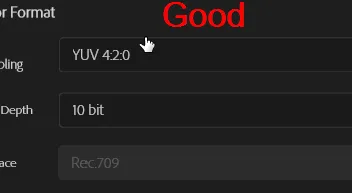
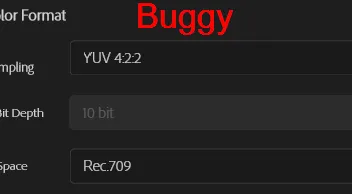
    2) Now, the real breakthrough. I tried changing Color Subsampling from YUV 4:2:2 to 4:2:0 in Premiere and the Preset 4 VBR thing worked. Switched back to 4:2:2 and it stopped working.

    I then tried running an CFR encode with the --mbr flag. That one worked too. I then made a few more tests, using both 1080p SDR and 4K HDR source files. 4:2:2 (with both Rec.709 and Rec.2020PQ) always froze (VBR with Preset 4) or resulted in a buggy output (CFR with --mbr), while 4:2:0 with Rec. 709 worked all the time, except, obviously, without outputting any HDR for the HDR files. I'm not sure what exactly is going on, but at least now that the two bugs are related and we also know where to look.


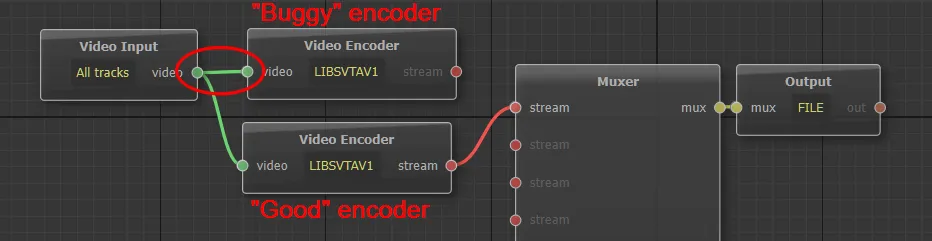
    3) Lastly, this is completely unrelated, but I found another otherwise minor issue that can potentially result in some really hard-to-detect errors. On the following screen grab, there are 2 encoder nodes. The first one is the buggy "VBR preset 4" one that never completes. The one below one that finishes just fine.

    As you can see from the picture, I forgot to disconnect the upper, "bad" one when I switched to the lower, "good" one, but since the bad one isn't connected to any output, I would expect it to be ignored anyway. However, the job hanged as if it were still active. Unless it's intended behavior, I would recommend completely ignoring any connected nodes that are not linked to a muxer node.

    Hope you find all this more helpful than annoying. If I run into anything else, I'll let you know.