

Unknown export failure

  • Hi, I'm having a weird problem with the trial version of Voukoder Pro and Premiere Pro 26.3.0. I installed the latest version of Vokoder and and FFMpeg and set up a system variable for its folder. When I try to export with default settings, I get the following error:
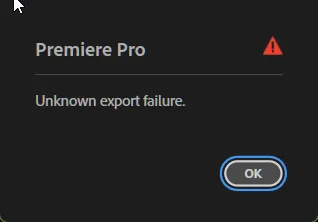
    I thought maybe the program couldn't find FFMpeg or my installation was missing something, so I installed the version linked here. Same problem. I uninstalled program and reinstalled it. Same thing. Then I noticed that I had an older version of Voukoder (2.0.12) that I never got a chance to test. I tried installing that instead and the default scene export worked. But when I changed it to other encoders like LiBSVTAV1 or LIBAOM-AV1, it failed with the same error. I uninstalled the old version, deleted all the Voukoder folders on C:\ and installed the latest one again: same error, even with the default scene. Changing debug to trace didn't help:

    Code
    Export Error
    Exporter returned bad result.
    Writing with exporter: Voukoder Pro
    Writing to file: I:\Premiere Projects\TEST.voukoderpro
    Around timecode: 00:00:00:00
    Component: Voukoder Pro of type Exporter
    Selector: 9
    Error code: 20

    Any idea what the problem might be?

  • Vouk 22. Juli 2026 um 18:53

    Hat das Thema freigeschaltet.
    • Offizieller Beitrag

    A good idea is to install only one version of "Voukoder Pro" at the same time. Each version of Voukoder Pro binds to exactly one major version of FFmpeg. (Version 2 binds to FFmpeg 7, version 2026 binds to FFmpeg 8).

    Best would be if you delete everything "Voukoder Pro" and "FFmpeg" related and install the latest Voukoder Pro and the latest FFmpeg afterwards.

    A good test to check if everything works is to run the "Designer" app and perform a "Scene Test" using the play button in the toolbar. If that is working fine then all components are properly installed.

    If it is not working please send me the Voukoder Pro logs.

  • I uninstalled one before installing the other and removed both folders (in Program Files and Appdata\Local). Then did the same before reinstalling the latest version. Are there some leftover registry settings I may need to delete? As for the logs, I checked and the only things they show are my system specs (Win11, common Intel CPU and NVIDIA GPU) and this:

    Code
    (info)    [VoukoderPro.cpp:201] Validating license ...
    (error)    [VoukoderPro.cpp:206] Please license this product!
    (debug)    [NetworkLicenseChecker.cpp:140] License responder stopped.

    Since it's a trial version, I assume this is normal? There are no other log entries apart from that.

    What can possibly cause PRORES_KS work in 2.0.12 but not in the latest version and cause AV1 fail in both? I thought it must have been a FFMpeg problem for sure, but my FFMpeg installation seems solid. I have C:\Program Files\FFMpeg\bin as a system variable and tried installing the binaries from both ffmpeg-8.1.2-full_build-shared from gyan.dev and the GPL build from your download page into that folder. Very weird and really annoying.

    Einmal editiert, zuletzt von RudiX (22. Juli 2026 um 21:35)

  • I finally figured it out. It wasn't the license but a rather silly mistake and a lot of consequent confusion on my part.

    The first time it failed was because I still had leftover files from the old version, which probably broke the new version's trial license or something. But after that, the reason PRORES_KS worked and LIBSVTAV1 or LIBAOM-AV1 didn't work was because of the default muxer container. I forgot to change MOV to MATROSKA when I deleted everything and tried different installations. I'm guessing MOV still doesn't support AV1 or VP9? Whatever the reason, everything seems to be working after I switched to MATROSKA.

    Just leaving it here in case anyone else encounters the same issue. You may also consider implementing a more specific error description, a log entry, or something like a red border around the Muxer node and an "incompatible container" popup on an encoder/container mismatch. Anyway, thanks for the help.

  • Vouk 25. Juli 2026 um 16:50

    Hat das Label Kein Bug hinzugefügt.