Vegas Pro 19 and Voukoder Pro 2026 : Latter Not Showing Up as a Render Format

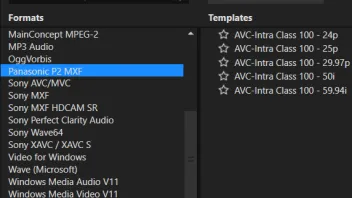
  • I've been using Vegas Pro 19 with a previous version of Voukoder Pro for about a year with no problems. But after upgrading, Voukoder no longer shows as an available Render format.

    I've upgraded ffmpeg from 7 to 8 after getting a warning from Voukoder but that hasn't cured it.

    The dll does show in the About...Component window but should it be "version: 18.0.0."?:

    voukoderproplug-vegas19.dll
    version: 18.0.0.0
    path: C:\Program Files\VEGAS\VEGAS Pro 19.0\FileIO Plug-Ins\voukoderproplug\voukoderproplug-vegas19.dll

    Please help! ;(

    • Offizieller Beitrag

    18.0.0.0 is okay as the plugin uses this API also for VEGAS Pro 19 API.

    I have to admit I'm fighting this bug for years now, and honestly I don't have a clue. It seems it's not in the code, I assumed it was something in the metadata / resources of the plugin dll, but the VEGAS Pro guys said i was wrong with this ... so this is still unknown why ít sometimes doesn't work. Sorry I don't have better news.

  • Hi,

    Same issue here. I'm a newbie. Just installed the latest Voukoder 2026 version from your website for Vegas Pro 21. It does not appear in Vegas Pro 21. The plugin appears as a component in Vegas:

    voukoderproplug-vegas21.dll
    version: 18.0.0.0
    path: C:\Program Files\VEGAS\VEGAS Pro 21.0\FileIO Plug-Ins\voukoderproplug\voukoderproplug-vegas21.dll

    But it not available in the 'Render As' format options


    As you say ... help?

  • try flushing you cache, when i installed voukoder it at first didnt show up but then after i flushed my cache it showed up. but now i myself have a different issue that i get "Unable to start Voukoder Pro:" when i try to render. for me i use vegas so i just go to

    C:\Users\Admin\AppData\Local\VEGAS Pro\18.0

    and i rename the 18.0 version to something else like 18.0_test then the vegas will not use that cache