


Can you paste a screenshot to explain exactly what you are missing?
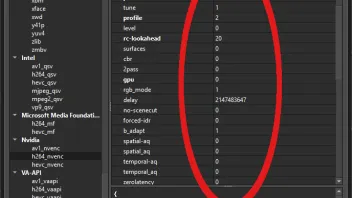
Settings list is all numbers, but no definitions. Need to cross reference with FFmpeg help-file to figure out what the hell each setting means.
Can you paste a screenshot to explain exactly what you are missing?
Settings list is all numbers, but no definitions. Need to cross reference with FFmpeg help-file to figure out what the hell each setting means.
It would be helpful to use the descriptive term for each encoder parameter (High, Low, Auto), rather than just the numerical setting (2, 1, -1). Makes setting up an encoder very tedious and difficult. Most people encountering this for the first time would probably move on to something easier to use.
The descriptive information is right there in the ffmpeg command line help, so why can't this info be used in the Designer app menus? Having to pull up the ffmpeg help on one screen so I can cross-reference Designer settings on the other screen is a royal PITA, and not at all user friendly. I had many presets, but now I can't even tell what settings I used without pulling up the ffmpeg help screen. All the setting values have been converted to anonymous numbers.
[EDIT: My bad, see below.]

I tested it with h264_nvenc/aac/mp4 just now.
miki1hris using hevc_nvenc in his example.
Try installing an old FFMPEG version from when your system was working, e.g. 2024. This won't work with VoukoderPro of course, but it might for Voukoder.
Still a problem in v2.1.0.
This can happen due to a video format error. Meaning your video settings in your NLE may be incompatible with the FFmpeg encoder you're trying to use. Classic example: trying to encode interlaced video using NVENC.
Apostrophe glitch remains in v2.0.7.
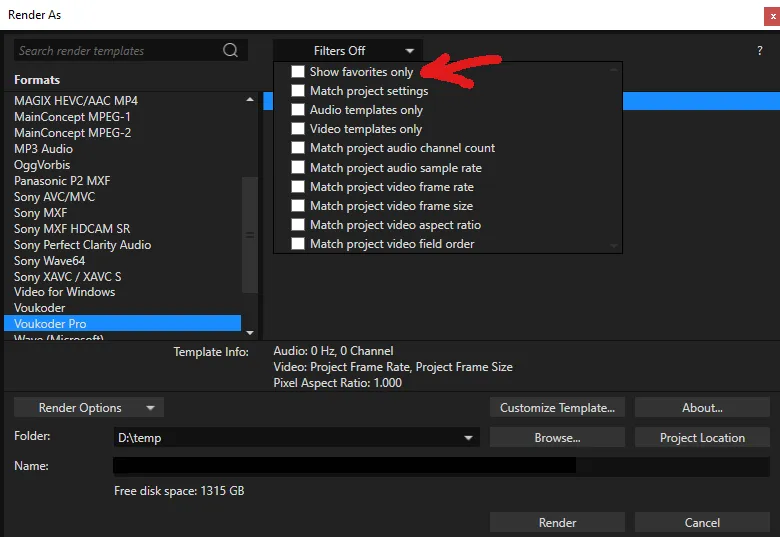
Make sure you have the "Show Favorites Only" filter turned off in the Render As window.
If max quality is your goal, why not choose a lossless option?
NLE = "non-linear editor" = your video-editing software, such as Vegas Pro or Adobe Premiere or Da Vinci Resolve.
This appears to be broken again in VoPro v2.0.6. I'm getting:
2025-01-25 22:29:30 (error) [OutputNode.cpp:199] Unable to open output: #ERROR\#ERROR - GPU0 - h.265 DL v0.6.mp4using ${OutputFile.Path}\${OutputFile.Name} - GPU0 - BD v4.9.1.mp4 with the target folder of D:\temp
UPDATE: Apostrophes (') in the filename cause the error.
Pretty sure he figured out what he was doing wrong. Maybe he even actually read the linked forum. 
"By confirming your payment, you allow Daniel Stankewitz to charge you for this payment and future payments in accordance with their terms."
Uh... no. Each and every future payment is going to be individually authorized by me.
Post your Voukoder/VoukoderPro settings.
Try encoding your video using Level 4.0.
In addition, you may find this forum helpful: Rendering for BluRay
Would the keylase patch help? (https://github.com/keylase/nvidia-patch) Obviously this is only a workaround, but sounds like for whatever reason something is not releasing NVENC? If that's the case, this might allow you to at least function.
I've had problems with Voukoder and VoukoderPro not releasing video memory after a render. So there is evidently an ongoing issue somewhere, causing video card resources to not be released in some instances.

...that I don't need: I have interlaced INPUT and need progressive output.
I need to deinterlace 50i content to 25p.
If your Vegas output is 25p, then why even mention interlacing? Why would Voukoder care what format your raw footage was? All it sees is the Vegas output.
NVENC options look the same. Which supports my point that the hardware features are fixed, regardless of software.
Define "better control of the hardware encoder". Which encoder options, in particular?
Sounds really like it's a VEGAS issue.
Agreed. Although it's interesting that it only crashes with Voukoder/VoukoderPro.