

I've created the showroom sub-forum for users to show their creations, guides and more. Show us your creativity!
Beiträge von Vouk
-
-
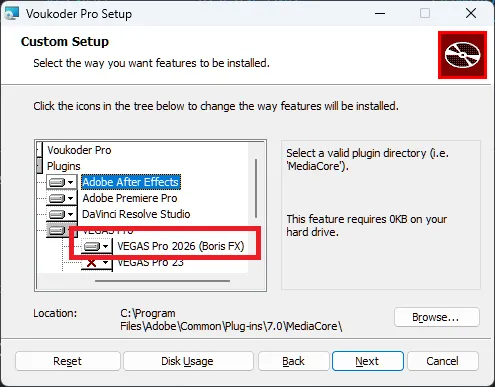
Please scroll the options a bit to the right, and look at the first entry under Vegas Pro

-
I just downloaded the file VoukoderPro-x86_64-2026.1.3.msi to make the above screenshot. The BorisFX option has to be there.
-
Okay, did you select VEGAS Pro here?
-
PFelby So you can see the voukoderproplug-vegas23.dll here?
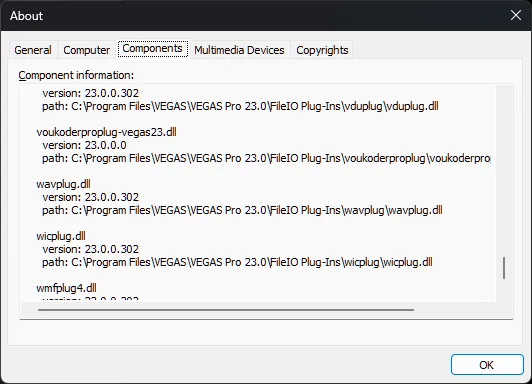
... but not here?
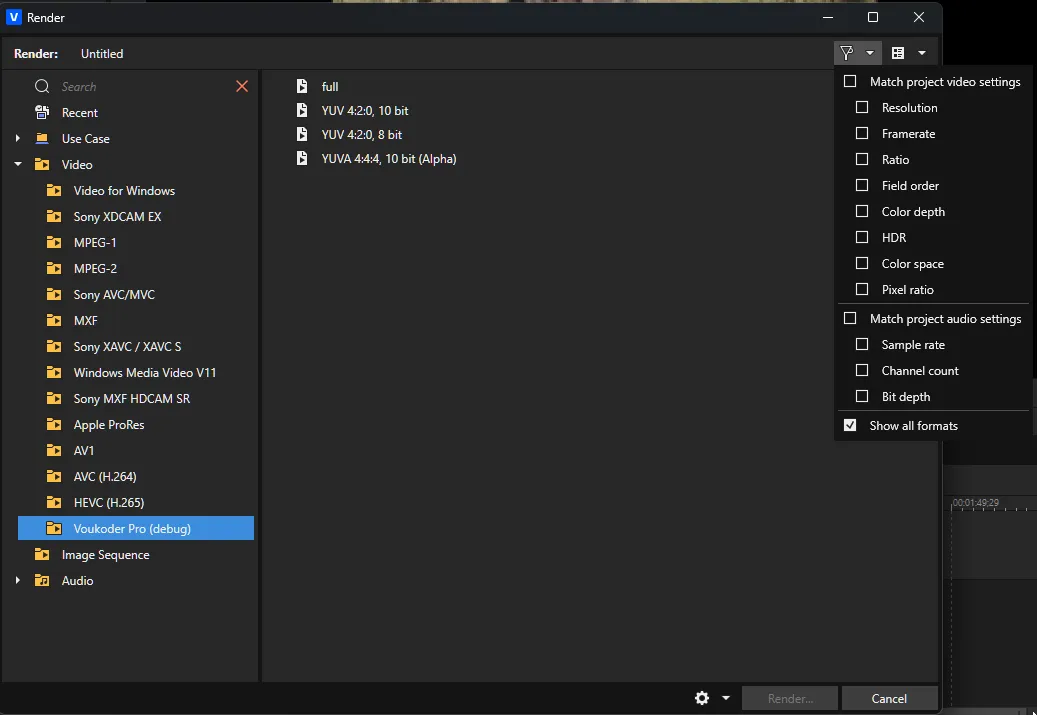
even if "Show all formats" is checked?
If so, that's one of the bugs in VEGAS Pro that's the reason why VEGAS Pro is only supported with the "some users have issues" foot note. Some users have the issue, some not. I had my code check by the VEGAS Pro developers back when Magix was still the owner, and their feedback was my code is okay. I only got this fixed myself when I was reinstalling Windows and all programs.
If anybody finds the reason why this is happening this'd help me alot.
Did you install Voukoder Pro for VEGAS Pro 22 too? Does it work there? It can be installed together with Voukoder Classic.
DXV
Voukoder Pro uses FFmpeg internally for the export. But FFmpeg 8.1 does not support this format / texture with DXV yet.
CodeEncoder dxv [Resolume DXV]: General capabilities: dr1 threads Threading capabilities: frame and slice Supported pixel formats: rgba DXV encoder AVOptions: -format <int> E..V....... (from 1.14664e+09 to 1.14664e+09) (default dxt1) dxt1 1146639409 E..V....... DXT1 (Normal Quality, No Alpha)As soon as FFmpeg supports DXT3 and DXT5 with DXV Voukoder Pro will be able to export it too.
-
Yes, I've seen exactly the same when I've tried it the first time.
I opened your project file and exported exactly the region you've had selected, and it worked.
Strange. What exact version of premiere are you using?
-

No, unfortunately no news or updates. I investigated this again. As far as I know this should have displayed the FPS of the project. I checked the code again, even did an analysis with the "Claude" (Amazon Q and GitHub Copilot) AI. No success.
I also wasn't able to get in contact with anybody of BorisFX for around 6 months. I don't have a good feeling about these bugs getting fixed or about future VEGAS Pro support in general, but - we will see.
In the Magix time I was in contact with the developers, with the project lead and even with their CTO.
-
Alright. I can see you created and configured the "4K" scene. That looks good to me. What did you do next in the "Render ..." dialog in VEGAS Pro?
Did you ...
- Customize and existing Voukoder Pro preset there and create a new one?
- If not ...
- customize the existing YUV 420 preset
- select the "4K" scene in that preset
- save the preset under a new name
-
I tried work on this just now, but i can't repoduce the issue anymore. I'm a bit confused. I also noticed the code didn't change much in the recent years.
- I created a new project with the "universial counting leader"
- I selected only the frames showing the "7 seconds" remaining
- Selected "Source in / Source out" for range
- I got a perfect export of only this section
I used Adobe Premiere Pro CC 26.0.2 for this test and I'm still using the SDK for Premiere Pro 22.
If you can provide more details how to reproduce this issue it'd be helpful.
-
Can you share the log file please? You can open it via the help menu.
-
I can reproduce this and I'm working on a fix.
-
As I have announced before I was working on the alternative subscription license option. This will go into beta phase from today on. Let's compare the features:
Perpetual Classic "Voukoder Pro" License Subscription license Model One time payment, use forever Recurring payment for each month Version limitations Bound to a single major version (i.e. Voukoder Pro 2 or Voukoder Pro 2026) You can use always the latest version Internet No internet connection required Requires an internet connection Price 69 EUR 6 EUR Feature set All included All included Cancellation - You can cancel anytime. The cancellation is effective by the end of the current month. OS support All supported OS All supported OS -
Voukoder Pro 2026 (3.1.3) is available for both Windows on x64 and Windows on ARM64 systems. Windows on ARM is currently available as BETA version. Although both is Windows, so this section applies to both - regardless if it is Windows on x64 or Windows on ARM64:

-
Please try to create a fresh new template by customizing one of the hardcoded and supplied templates.
P.S.: Hold SHIFT+CONTROL when starting up VEGAS Pro. The you can clear the cache.
-
I have fixed a critical bug in the VEGAS Pro plugin for the versions 18, 19, 20 and 21.
To all users having issues with that versions before: Please test it again and report if it's working now.
-
Done. Thanks
-
I've added support for VEGAS 2026 from the new owner Boris FX in version 2026.1.0.
-
The non-western characters in the email with your trial license should now be properly encoded.
-

Please note that the latest Vouk Pro 2026 installer (2026.0.21) does not have an option to install to Boris FX Vegas. So, this script (or manual copy) is still required.
Yes, I'm waiting for the contact with Derek Blume and if Boris FX still wants to collaborate with me regarding VEGAS Pro.
-
I have checked your transactions. You have bought a license for Voukoder Pro 2.x last year. You can use this 2.x license for an unlimited time.
The license is stored at %LOCALAPPDATA%\VoukoderPro\license.txt.
Voukoder Pro 2026 (or internally Voukoder Pro 3.x) requires a new license.