

• Hey Vouk. I don't really Transcoder myself because I'm forced to export from Premiere Pro, but I ran a few tests on it yesterday (because of that Premiere VBR issue I mentioned earlier) and marked down some ideas for a few potential GUI improvements other people may find useful. So these are not exactly feature requests for something I'll rarely use myself, but more like general constructive feedback for your consideration.

    1) Right-click context menu for selected jobs to make their management easier:
    • Disable/Enable (similar to "Skip Selection" in Adobe Media Encoder, disables a job as if it were completed)
    • Move Up
    • Move Down
    • Go to Source (opens source file's folder)
    • Go to Output
    • Duplicate
    • Remove

    2) Open source file's folder.
    For that pop-up window that opens when you click on the File column's entry, add an "Open Folder" button above "Close":
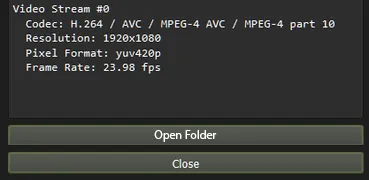
    3) Open target folder tweak.
    You can already double-click on the output field to open the output folder when the job is done, but it makes sense to allow even while the job is still encoding. Right now, double-clicking on it while encoding does nothing.

    4) Reordering jobs.
    For the job number # column: instead of selecting multiple jobs upon clicking, allow to drag-and-drop a specific job to reorder it (move it up/down a queue). People with many jobs will probably be happy to have this. I reorder jobs all the time in Media Encoder.

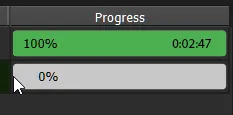
    5) Encoding time on the progress bar (both "Time Elapsed" for jobs in progress and "Encoding Time" for completed jobs).
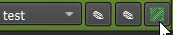
    6) I brought up a "Show FFmpeg Command Line" option earlier. No idea if it's worth the hassle or even doable, but just in case if you ever decide to implement something like that in Voukoder, I'd probably add another button next to the scene selection in Transkoder for it.

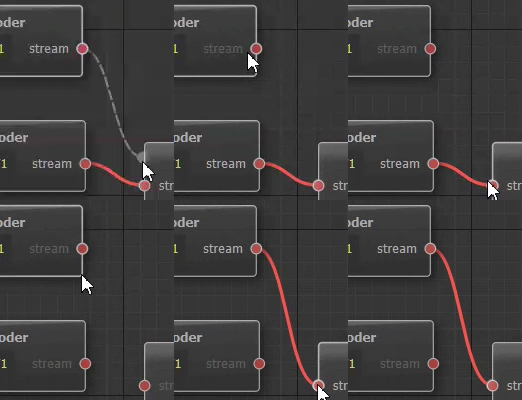
    x) Finally, this is for Voukoder and I may have already brought it up before, but it would really be great to have Copy and Paste node context menu options. Maybe even Rename, to quickly see what each node is about without comparing their params. Now that I'm typing this, I remember another super minor Voukoder GUI inconvenience. Here's a quick GIF to illustrate it:
    Hope any of this is helpful. Cheers.
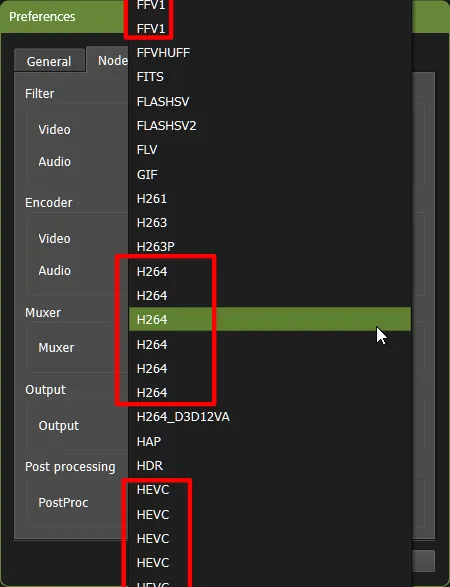
  • Also reporting a very minor UI issue:

    In Preferences → Nodes default selections, there are many identical entries.

    Filter → Video: too many to list.
    Encoder → Audio: AAC, AC3
    Encoder → Video: AV1, H264, FFV1, HEVC, MJPEG, MPEG2, PRORES_KS, VP9

    The rest are okay.

    • Offizieller Beitrag

    Thanks for your feedback!

    I added the Move Up / Down movement using mouse drag n drop and added the other context menu items.

    2) Open source file's folder.
    For that pop-up window that opens when you click on the File column's entry, add an "Open Folder" button above "Close":

    Done.

    3) Open target folder tweak.
    You can already double-click on the output field to open the output folder when the job is done, but it makes sense to allow even while the job is still encoding. Right now, double-clicking on it while encoding does nothing.

    Done..

    4) Reordering jobs.
    For the job number # column: instead of selecting multiple jobs upon clicking, allow to drag-and-drop a specific job to reorder it (move it up/down a queue). People with many jobs will probably be happy to have this. I reorder jobs all the time in Media Encoder.

    See topic 1.

    5) Encoding time on the progress bar (both "Time Elapsed" for jobs in progress and "Encoding Time" for completed jobs).

    Done..

    6) I brought up a "Show FFmpeg Command Line" option earlier. No idea if it's worth the hassle or even doable, but just in case if you ever decide to implement something like that in Voukoder, I'd probably add another button next to the scene selection in Transkoder for it.

    Sounds easy, but it's actually not. Many C API functions can't be mapped 1:1 to the FFmpeg CLI options. Maybe I'll add it later if i have a good idea how to do it.

    x) Finally, this is for Voukoder and I may have already brought it up before, but it would really be great to have Copy and Paste node context menu options. Maybe even Rename, to quickly see what each node is about without comparing their params.

    I might also do this at a later time.

    Zitat

    Now that I'm typing this, I remember another super minor Voukoder GUI inconvenience. Here's a quick GIF to illustrate it:

    1375-fa56463cb6fe844f4e1be47eef15ed7dac03160bd44f81bb48323559a139e158.gif

    That's a limitation of an underlying library, and that's why I have added 10 input nodes to the muxer. Only output nodes can be assigned to multiple inputs. I'll rework this that it'll always show n+1 inputs.

  • Regarding the last one, what I meant was that, in a situation like this, it would probably make more sense to unlink the old old encoder node connection and replace it with the new one. Instead you have to first unlink the old one manually and only then link the new one to the same input node. That tiny extra step is really not a big deal, of course. I just mentioned because it would make the UI a bit smoother.