Vegas - Voukoder ... Pro rendering questions

  • Hello!

    Specifications:
    Vegas pro ver 22 - 2026
    Metainfo v26.05
    Voukoder pro (Experiments)
    PS! I have AMD Ryzen 7 7840U RAM 64GB / Radeon 780M Graphic 16GB, Windows11 Home 25H2, AMD drivers latest

    I use Osmo Bocket 3 10bit HLG (HVEC) video files in Vegas.
    Color range : Limited
    Color primaries : BT.2020
    Transfer characteristics : HLG
    Matrix coefficients : BT.2020 non-constant

    I want to render a video file from Vegas that would have the same metadata as the original. It would be nice if the final rendering was of the same quality as the original material. For archiving but also for viewing.

    At the moment I'm trying an AMD/amf (GPU) HEVC encoder.

    No matter how I try, "Transfer characteristics: HLG" is replaced by PQ.
    "Matrix coefficients: BT.2020 non-constant" is missing from the metadata at all.

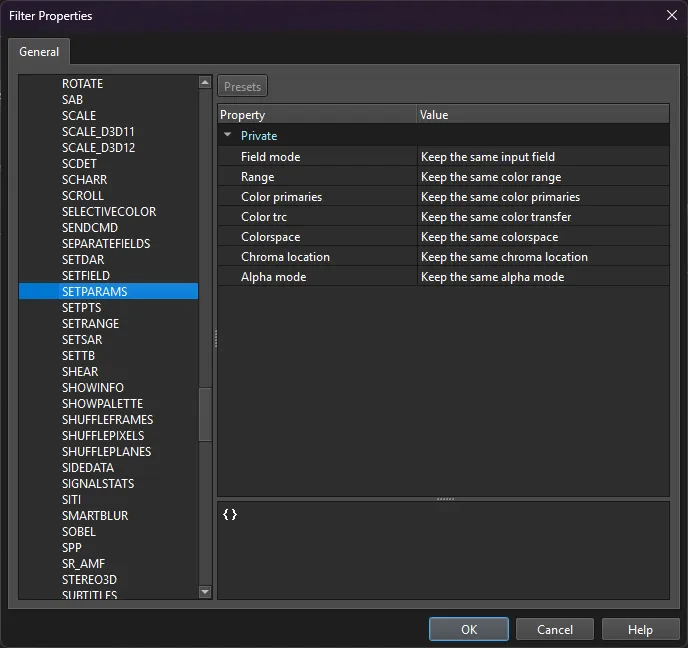
    I tried to change the Scene - Video Input params ...
    Colors Range - limited,
    Color space: Matrix - BT.2020nc, Primaries - BT.2020, Trasfer - ARIB STD B67.

    But that didn't change anything. It still turns out that "Transfer characteristics:" are PQ and "Matrix coefficients:" are missing.
    In video players, the colors are therefore incorrect.

    If I select the same video file in Voukoder Pro Transcoder and render it with the same "Scene", then everything is in place as it should be.

    Here's my Scene profile ::::::::::::::::::::::::::::::::::::::::::::::::::::::::::::::::::::::::::)

    2 Mal editiert, zuletzt von rif (23. September 2026 um 22:55)

  • Vouk 24. September 2026 um 07:36

    Hat das Thema freigeschaltet.
  • OK!

    Second attempt:
    libX265 CPU rendering. (Still for rendering Osmo Bocket 3 10bit HLG files out of Vegas without losing quality.)

    Just in case, I will also put here the metadata of the original file that has been imported to Vegas (Metainfo v26.05):

    NB! I don't know what data is being sent from Vegas to Voukoder.

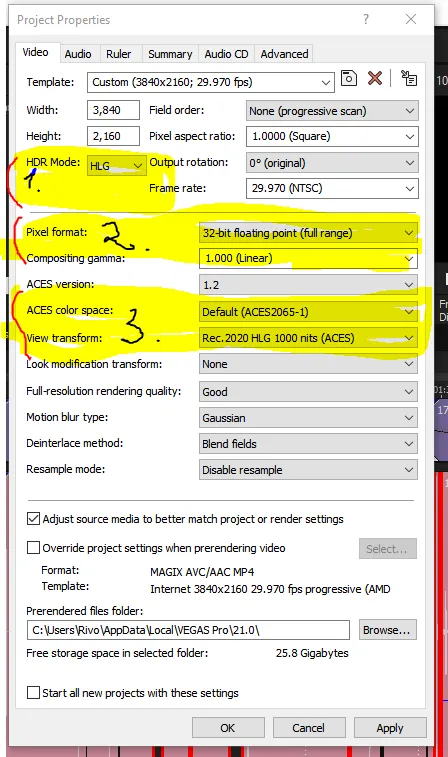
    I set in Vegas as the project settings -->
    Pixel Format: 32bit floating point (full range),
    HDR Mode:HLG,
    Compositing gamma: 1,000 (linear),
    ACES: 1.2,
    ACES color: Default (ACES2065-1),
    View transform: Rec.2020 HLG 1000nits

    Just in case, I'm going to change the Vegas render profile (Project tab) -->
    Color space: Rec.2020 HLG 1000nits,
    Color range (YCbCr output): Limited (Default
    ) ... (I don't know what would happen if I selected "Full" from the drop-down menu.)

    In order to obtain the same metadata as the original file when rendering in Voukoder, I had to create the following lines:
    X265 params:
    colorprim=bt2020:colormatrix=bt2020nc:transfer=arib-std-b67
    And to get the rendered file into the metadata - Format profile: Main 10@L5@High (it turned out that it was Main 10@L5.1@High).
    I had to add:
    level=5.1:profile=main10:tier=high
    The rest of the parameters, if anyone is interested:
    "passes": 1,
    "rc": 0,
    "crf": 15,
    "g": 10,
    "bf": 0,
    "preset": "slow",
    "profile": "main10",

    PS! You can't really choose anything more from there, because there are no drop-down menus and descriptions, unlike Voukoder's old free versions :).

    But my question is:
    Is the rendered video ... Vegas-out -> Voukoder-in -> ffmpg-out -> Remux-> rendered fail(mp4, mov, .etc) as desired and close to the original?
    And well, a rendered video file is not really the kind that needs these metadata.

    • Offizieller Beitrag

    Hi,

    You've actually already discovered the important part yourself. Let me try to explain why it behaves the way it does, and answer your final question.

    1. Why AMF replaces HLG with PQ and drops the matrix

    This is a limitation of the AMD AMF HEVC encoder itself, not of Voukoder or your Scene setup. The color node in your Scene (range: tv, matrix: bt2020nc, primaries: bt2020, transfer: arib-std-b67) is correct — that's exactly what you want. But hevc_amf doesn't reliably write the VUI color signalling into the bitstream:

    • It tends to hardcode/assume PQ (SMPTE ST 2084) for 10-bit BT.2020 HDR, which is why HLG comes out as PQ.
    • It frequently omits the matrix coefficients (bt2020nc) altogether.

    The reason it "just works" in the Voukoder Pro Transcoder is that a transcode copies the color metadata straight from the source and hands ffmpeg an already-tagged stream. When rendering from Vegas, Vegas feeds raw frames into Voukoder, so the color tagging has to be produced by the encoder — and AMF doesn't do it correctly. Changing the Vegas "Scene / Video Input" color params won't fix it because the problem is downstream at the AMF encode stage.

    So this is not something you're doing wrong. AMF simply can't tag HLG properly here.

    2. Your x265 approach is the correct fix

    What you did is exactly right:

    Code
    colorprim=bt2020:colormatrix=bt2020nc:transfer=arib-std-b67

    Those three params write the VUI signalling explicitly into the stream, which is why the metadata now matches the original. arib-std-b67 is HLG, so that's correct. Adding level=5.1:profile=main10:tier=high to match the source's Main 10@L5.1@High is fine too (note the source is actually L5.1, as you found — L5 vs L5.1 only changes the declared level ceiling, it doesn't affect image quality).

    One small note: you have both colorprim=... in the params string and the color values set in the Scene input node. That's fine — they're consistent — but the x265 param string is what ultimately guarantees the tags in the output.

    3. Your actual question: is the rendered file "close to the original"?

    A few things to separate here:

    • Metadata: With the x265 params above, yes — your output carries the same color primaries / transfer / matrix as the source, so players will interpret HLG correctly and the colors will be right.
    • Quality: With crf=15, preset=slow, profile=main10 (10-bit), you're encoding at very high quality — visually this will be effectively indistinguishable from the ~80 Mb/s source for archival/viewing. Understand that it is still a re-encode, not a lossless copy: the frames pass Vegas → (your project is 32-bit float, ACES, Rec.2020 HLG view transform) → Voukoder → x265. So it's a new generation, not a bit-for-bit copy of the original. For "archival + viewing" that's a perfectly reasonable tradeoff, and CRF 15 slow is more than enough.
    • One thing worth checking: your Vegas project is set to full ACES pipeline (ACES 1.2, ACES2065-1, Rec.2020 HLG 1000 nits view transform). That's a real color transform, so the rendered pixels are the result of that pipeline, not the untouched camera pixels. If your goal is a faithful archive of the original look, consider whether you actually want ACES in the chain, or whether a simpler HLG (Rec.2020) project setup that passes the material through more directly is closer to your intent. Keep your render profile's YCbCr output at Limited to match the source (Limited/tv) — don't switch to Full, or the levels won't match the original.

    Short version: AMF can't tag HLG correctly from a Vegas render — that's an encoder limitation, not your fault. Your x265 + transfer=arib-std-b67:colorprim=bt2020:colormatrix=bt2020nc route is the right way to get matching metadata, and at CRF 15 / slow / 10-bit the quality is excellent for archival, keeping in mind it's still a re-encode (and your ACES view transform does alter the pixels).

    Hope that helps!

  • Thank you very much for the tutorials!

    Is it possible to forcibly change the metadata of the final file after rendering the AMD/amf gpu?
    (Change Transfer characteristics: to HLG and add Matrix coefficients: BT.2020 non-constant, without re-rendering the video)

    PS! The bit rate is tuned to reach about 80-90Mbs. CQP or CBR/CQP and 10-bit is selected (source 3840x2160, FPS 29.970 (NTSC) 4:2:0, 10bit).
    Which is the better option ... libx265 (cpu - slow rendering) vs. AMD HEVC (gpu - fast rendering) to maintain the best quality for encoding later into other formats or reusing in a video editor.
    But I don't want larger files than the original material (Osma pocket 3: 10bit, 4k, Overall bit rate 83.2 Mb/s, HLG, (mp4 HEVEC))
    NB! it is not necessary that the final rendering is in the MP4 container (if that changes something, oh... OK, Vegas Pro doesn't like MKV files).

    AND MORE! There was also a question about what settings in the Vegas Pro project settings (or also in the Vegas rendering template settings) are important when rendering with Voukoder... for example: if I have 8bit set in the Vegas project settings, will the raw material output to 8bit or does it not matter to get a 10bit final render? Considering that Voukoder already has 10bit set to the encoder.

    Thank you in advance if anyone has any recommendations :)

    5 Mal editiert, zuletzt von rif (27. September 2026 um 18:50)

  • CPU encoders (e.g., x265) are capable of the best quality, but are very slow.

    Hardware encoders are very fast, and are capable of decent quality.

    Your choice which you use.

    ***

    If you set anything in the render/encode toolchain to 8-bit, you'll only get 8-bit quality data out, even if everything else in the chain is 10-bit. That's just a simple mathematical fact.

  • ==================================================
    I will not leave my Estonian stubbornness ;)
    ==================================================

    I asked ChatGPT similar questions out of curiosity (especially regarding hevc_amf GPU rendering, HLG BT.2020... ARIB_STD_B67 format) :)
    Don't criticize me! :P
    I know that AI tends to mess everything up.
    But maybe there are things there that we haven't noticed ourselves.
    I don't know. Everything seems mixed up like potatoes and cabbage in a pot. :D

    ==================================================
    ChatGPT: Reply that can be posted in the Voukoder forum: :P

    He doesn't give any reference from which he puts together his answer. :D
    ==============================================================


    PS! I found a couple of interesting writings to get the (AMD/amf HEVC h.256) metadata right.
    But I haven't tried it yet.

    How to add colour space metadata to an HEVC/H265 file with ffmpeg


    and

    How to Change Video Color Matrix with FFmpeg - ffmpeg
    Adjusting color matrix coefficients in standard definition (SD) video is critical for avoiding washed-out colors or improper tinting during playback or…
    salivity.github.io

    10 Mal editiert, zuletzt von rif (28. September 2026 um 20:59)

    • Offizieller Beitrag

    If I set the Vegas Pro project settings to 8bit, will it output 8bit material for VOUKODER?
    Or the settings of the Vegas project are not relevant here?
    And VOUKODER renders (from Vegas output) 10bit video according to the encoder settings? (the original material is imported to 10bit to Vegas)
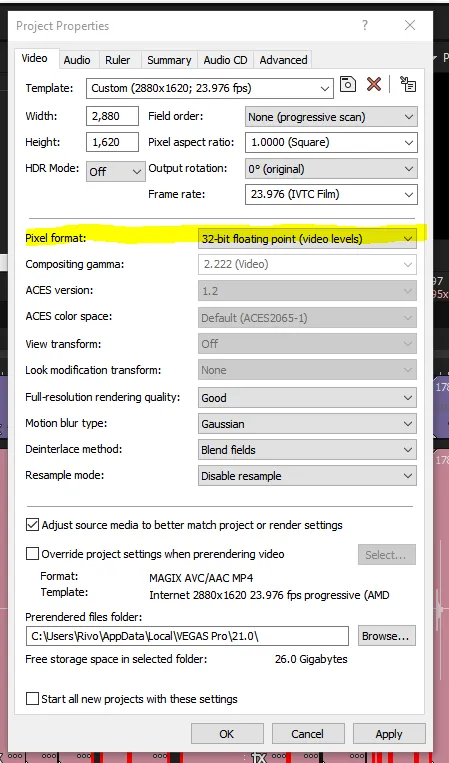
    If this is not the case! Then should I select Pixel format: 32-bit floating point in the Vegas project settings? To get a real 10-bit video to VOUKODRER input and encoder output.

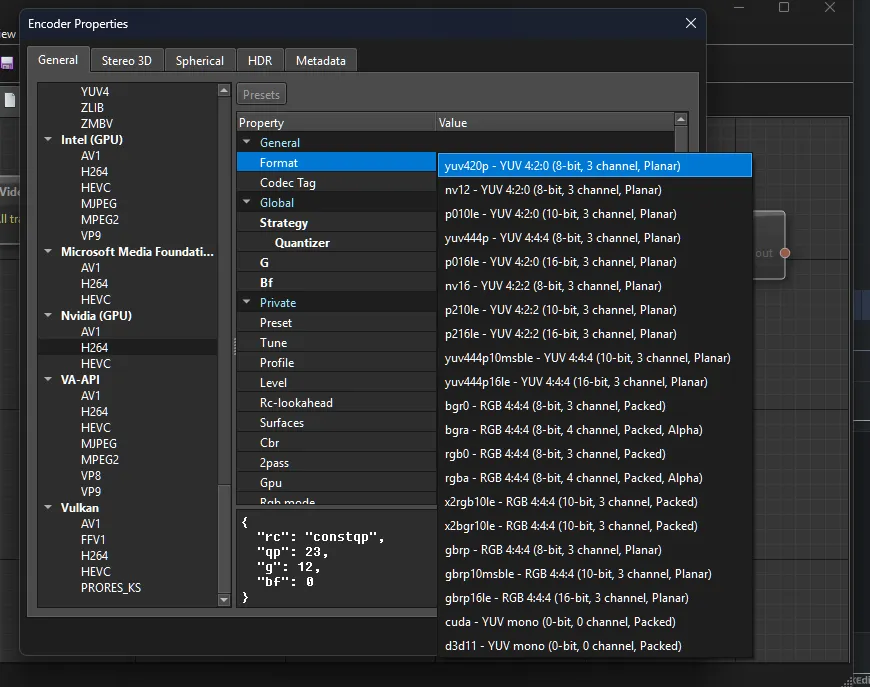
    What finally decides about the actual export color format is this dropdown here:


    In VEGAS Pro you can just select the format which is sent to Voukoder Pro. So if you send 8 bit data to Voukoder Pro and export 10 bit data to a file, Voukoder just converts 8 bit data to 10 bit, but effectivly it is just 8 bit data packaged as 10 bit. In theory you could do this, but the other way around (10 [or more] bits -> 8 bits) would actually make better results.

  • Thank you VOUK... this means that in Vegas it would be useful to put a 32 bit float (when i have 10bit materjal in timeline), then 10bit from the Voukoder Encoder before the final render. I guess I understand correctly? (I can't send 10bit out of Vegas. Only 8bit and 32bit are selectable.)

  • If someone has a similar case with Voukoder when rendering in Vegas Pro (as I have described before),
    selecting from Voukoder (AMD (GPU) -> HEVEC -> Format p010le- YUV 4:2:0(10-bit, 3 channel, Planar)
    and AMD encoder will insert the wrong flags in the metadata of the rendered file in the case of HLG (HDR, Hybrid log–gamma, ARIB STD-B67, BT.2020) !!

    Then: Try "Windows Commant Prompt" with this ffmpeg command line, for a file that has already been rendered (it will only change HEVEC Metadata without re-rendering the file). It worked for me, and Videoplayers will play the copied file correctly.
    NB! You have to set the input file and output file path yourself.

    Code
    C:\Windows\System32>
    ffmpeg -i "D:\0-AudioVideoProjects\VideoProj\TEST\vegas2026-1.mp4" -c: copy -bsf:v hevc_metadata=colour_primaries=9:transfer_characteristics=18:matrix_coefficients=9  "D:\0-AudioVideoProjects\VideoProj\TEST\vegas2026-HLG.mp4"
  • Thanks VOUK! :) I'll try it

    But I still haven't understood how the Vegas Pro data feed coming into Voukoder is handled.

    What is important in Vegas Pro project settings (File->Properties) for Voukoder rendering?

    I want to get 10bit, HLG (HDR) real rendering through Voukoder.


    Nr 2. has four options (8bit... video levels or full range and 32 bit floating points... video levels or full range)

    Nr 1. (HDR mode) HLG cannot be selected if Nr 2. (Pixel format) is not selected to 32bit floating point (full range)

    Nr 3. Will it send Rec. 2020, HLG, 1000nit to Voukoder for rendering?