

Does anyone have recommendations for the best settings for high-quality, Blu-ray compatible video (h264) output in Voukoder Classic when using DaVinci Resolve Studio?
I'm especially interested in knowing the best settings for retaining film grain detail. Even with tuning enabled and set to "Grain", my current rendering settings are butchering the grain. If possible, I'd like to know the best settings for both higher-bitrate video (to fit on a BD-50), and lower-bitrate but still high-quality video (to fit on a BD-25).

Best video rendering settings for Blu-ray when using Voukoder with DaVinci Resolve Studio?
-
-

Vouk
1. April 2024 um 07:26 Hat das Thema freigeschaltet. -
what is your blu-ray authoring program? that might be your starting point, for example I'm using DVD Architects and that has different requirement than some others.
whether it's BD-50 or BD-25 all depends on the length of your contents.
-
my current rendering settings are butchering the grain.

what is your blu-ray authoring program?
Rocketeer When you say the grain is butchered, are you viewing the rendered file directly...or are you viewing a Blu-ray disc that has been re-encoded by an authoring program?
-
I'm sorry it took me so long to post in this thread again, but I didn't realize anyone had replied to me, since there were no replies for 11 days and I must have not noticed or received any email notifications when the replies did come.
Since then, I have been able to create good quality encodes in Vocoder in terms of picture quality (including grain retention), but I have recently discovered that I was probably not using appropriately Blu-ray compatible settings.
I did find this other thread that has some potentially promising sets of settings:
ThemaRendering for BluRay
I still have clients who want BluRay disks. I have tried checking the BluRay compatibility box in Voukoder dialog, but even with that set, rendered output is re-rendered by my BR authoring program. I use TMPGENC Authoring Works, version 5.2.6.55. What setting should I use to eliminate the re-rendering?
Thank you in advance. dxdy
dxdy7. Juli 2021 um 19:21 However, I am not entirely certain if any of those is truly ideal for my use-case. The ones by avwtp looked especially promising, but upon looking at them closer, there are some very odd settings, There are things like enabling fake interlaced (I don't understand why that would be needed for 23.976 fps footage) and a VBV initial buffer size that seems rather high for Blu-ray (since I've read that Blu-ray encodes use only 0.5 to 0.75 as a general rule).
In a nutshell, I want to encode fully Blu-ray compatible video in as high quality as possible, retaining as much grain detail as possible. I mostly want to use x264, but it would wouldn't hurt to also have some settings for NVenc H264 in case I wanted to use that now and then. I also would like to have the ideal settings for both BD25 and BD50 sized outputs.
EDIT: Using cobbled-together information from this forum and elsewhere I came up with a set of settings. Here they are:
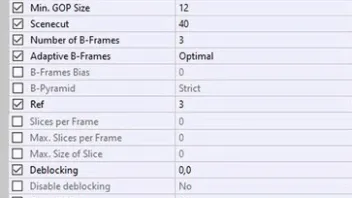
I do know that it works in one sense, which is that the resulting video is very high quality in appearance, with excellent detail preservation, despite significantly smaller size than the original. It also takes only 3 hours to render for a 2-hour movie. However, I'm not certain whether it is a hundred percent Blu-ray compatible. I used CRF because whenever I try to use VBR (which is labeled as ABR in Voukoder when using H.264), DaVinci Resolve gives me the error message "Render job failed - Cannot find appropriate codec for encoding the video frame" unless I disable multipass encoding, which from what I understand would significantly reduce picture quality. I used Level 4.1 instead of 4.0 because I don't use TMPGEnc.