

Hi Vouk, any news after our new friend VegasSteve replied? 
Thanks!
Hi Vouk, any news after our new friend VegasSteve replied?
Thanks!

I guess if you have video clips on the time line DaVinci Resolve is also rendering and sending both audio and video to Voukoder Pro, even if video track is then ignored. You can try to disable the video export in DaVinci Resolve. Is it better then?
If you have no video tracks in the timeline it doesn't render it and does not send it to Voukoder Pro.
I just tried it.
If I disable all video tracks and start the render, the speed is perfect.
If I enable the video tracks, the render time increases dramatically. It looks like Voukoder is processing the video as well.
Example: 1h 40m project with 4 video tracks, audio tracks, and 2 subtitle tracks.
Video tracks disabled: 1m 14s render time
Video tracks enabled: 40m+ render time
Davinci Resolve 21 here with Voukoder 2026.1.3.0
Try to encode only audio with this simple preset:
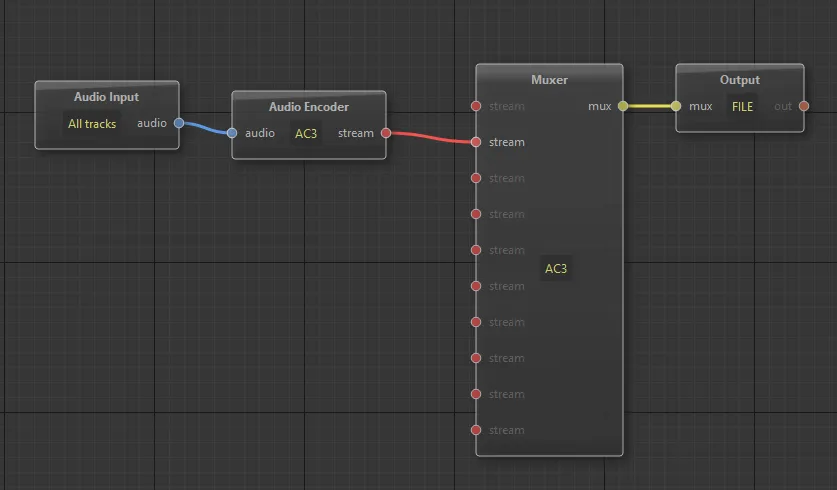
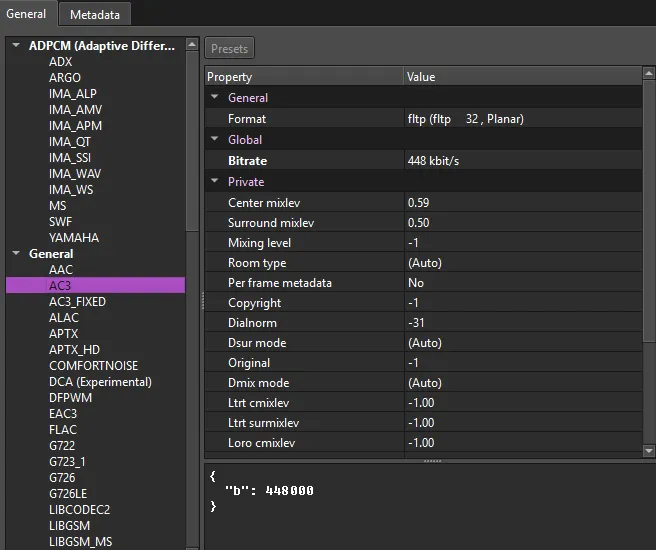
Can you check please?
Thanks!
PS
Which one is to use?

BorisFX Vegas 2026.0 (Build 66)
Voukoder Pro 3.1.3
Country: Italy.

Any news please?
Thanks!
I'll try to reproduce the issue. It shouldn't be like that.
1) take a 1h 30m ac3 5.1 file
2) with ffmpeg convert to flac 5.1
3) import in Vegas
4) try to export with Voukoder (ac3 5.1)
What NLE are you using?
Magix Vegas Pro 20, sorry
Hi,
anyone noticed this? 
I have to export to .w64 (48k 24bits 5.1) and then (with ffmpeg via Windows Console) export to ac3 (48k 24bits 5.1) 
2h 31m movie --> 2h+ audio encoding time via Voukoder... (no video transcoding)
ffmpeg encoding (1m 44s encoding time):
Input #0, w64, from 'audio.w64':
Duration: 02:30:54.11, bitrate: 6912 kb/s
Stream #0:0: Audio: pcm_s24le ([1][0][0][0] / 0x0001), 48000 Hz, 5.1, s32 (24 bit), 6912 kb/s
Stream mapping:
Stream #0:0 -> #0:0 (pcm_s24le (native) -> ac3 (native))
Press [q] to stop, [?] for help
Output #0, ac3, to 'audio.ac3':
Metadata:
encoder : Lavf61.7.100
Stream #0:0: Audio: ac3, 48000 Hz, 5.1, fltp, 448 kb/s
Metadata:
encoder : Lavc61.19.101 ac3
[out#0/ac3 @ 0000013acc2de040] video:0KiB audio:495147KiB subtitle:0KiB other streams:0KiB global headers:0KiB muxing overhead: 0.000000%
size= 495147KiB time=02:30:54.09 bitrate= 448.0kbits/s speed=87.1x
Thanks!
PS
my project has an audio mix btw: a group of 6 tracks (for 5.1) and another track with several Stereo clips.
Need Voukoder in Digitalworkz Phoenix

.... and if that wasn't the problem, post your log file (%localappdata%\VoukoderPro\logs\)
You've got something configured wrong in a way that FFmpeg refuses to deal with.
Thanks for your support.
What's the correct configuration of ffmpeg for Voukoder?

This issue occurs because there is no preset saved in Scene Design. To resolve this, you must first open Voukoder Pro Designer on the desktop to create and save a preset. Only then will Scene Design open directly in the editing programs so you can create your presets.
See my screen recording in this link showing the procedure.
https://www.dropbox.com/scl/fi/237hy9s…k746d2jgbx&dl=0
I think there should be a default preset saved in Voukoder Pro's Scene Design. I believe this would be the solution to solve this small problem.
Thanks!
creating a preset then I can open the voukoder window.
But when I click render this is what I see.
Can you help me please?
Did you select Vegas 20 in the VoukoderPro installer options? You have to manually select your NLE from the list.
Also, make sure you have the "Show Favorites Only" filter turned off in the "Render As..." list in Vegas.
Resolved! Thanks!
Anyway, when I click this botton nothing happen. Why?
Hi,
I just installed VoukoderPro but I don't see it on Vegas Pro 20.
Thanks