Beiträge von Vouk
-
-
Did you check the "show all formats" checkbox?
-
Almost ... You have to install FFmpeg 7 to work with Voukoder Pro 2.
Just uninstall FFmpeg 8 and install FFmpeg 7.x
-
I'm sorry to say the old Voukoder app is not supported anymore. I'm focussing on Voukoder Pro now.
-
Anyways, as this is an annoying issue with VEGAS Pro I tried to apply that hack again and make this time even configurable ONLY for VEGAS Pro. Well, at least I asked Amazon Q / claude (AI) to do it. Surprisingly that actually worked quite well!
You might need to delete the existing templates.
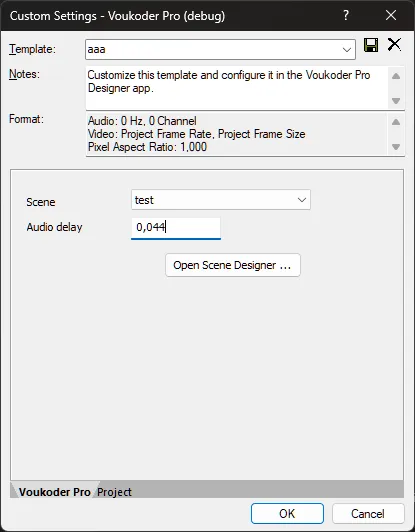
Can you (or others) please test this if this helps you? The above value might not be correct, just play with it.
-
No, i considered this as a hack. This might also be the wrong approach if users are using other NLEs than VEGAS.
-
I fixed the VEGAS Pro plugins in Voukoder Pro 2026.
-
What version of Voukoder are you using?
-
First, I hope you meant with "Voukoder Pro 3 files" actually this file VoukoderPro-2_VEGAS_Pro_23-v3.zip.
This should be copied over the VEGAS Pro 23 directory and install the new Voukoder Pro plugin there.
Otherwise it's never good to mix different versions of tools.
Please tell me the version numbers you have installed.
-
Please try the update V3 from the download page and tell me if the issues are solved.

-
Depends on whats needed ...
- i420
- p010
- a410
Most encoder use YUV and I try to avoid any format conversions.
-
This issue was about VEGAS Pro 23 didn't show Voukoder Pro in the Render dialog. That has been finally solved.
(Just keeping track of all threads / issues now)
-
I'll check this.
-
It seems this fix was finally successful. It just took me 7 years to fix this. Phew ...
I have applied this fix to all VEGAS Pro version of the 2026 release.
-
Not automatically, but you can add this adelay filter manually.
-
The way the classic Voukoder fixed it was it added a 2s (IIRC) audio delay invisible to the user in the filter chain.
The alternative was to switch VEGAS back to an older audio renderer, but I can't remember that one in detail.
-
Is it same issue as discussed here https://www.voukoder.org/forum/thread/1587 ?
-
But can you open the scene manually and edit it?
In the beta release it has been reworked that i always open the scenes that were open the previous time.
-
I'm not sure if a Steam-Edition is actually supported. You'd have at least to adjust the installation path of the VEGAS Pro 21 plugin to wherever Steam has installed VEGAS Pro 21. Normally I assume people install VEGAS Pro from the normal direct shop. But please keep me up to date if you got i working.
Normally Voukoder Pro installs the plugin to this path, but you can adjust this in the installer:
C:\Program Files\VEGAS\VEGAS Pro 23.0\FileIO Plug-Ins\voukoderproplug\voukoderproplug-vegas23.dll
-
Here you can attach files. That's not possible in the Announcements forum, as normally no discussions should be held there.
But the log file you have emailed me looks good. i don't see any issues.
Do you have a VEGAS logfile that contains an error message?