


Optimized and should give a slight performance increase of around 8%.
Beiträge von Vouk
-
-
Nearly ready for the end of the BETA ...
-
The new version contains some smaller bugfixes.
-
I have finally re-done the Voukoder Pro documentation. It is now GITHUB based and still far from being complete.
You can check it out by clicking either on the "Documentation" link or by going to https://docs.voukoderpro.com .
P.S.: I'm still struggeling with showing the TOC - which should actually get auto generated. Any ideas?
-
There are actually 7 beta releases of 3.0. What version exactly did you use? What was the installers filename?
-
This version has the VEGAS Pro plugins reverted back to the stage where they were compatible with VEGAS Pro 22 again (No audio delay feature anymore).
-
Can you please tests if that issue has been solved now?
The new version 5 is using the existing scenes from the version of VEGAS Pro 22 again. So VEGAS Pro 22 scenes and VEGAS Pro 23 are compatible again.
The downside is you have to delete and recreate any newly created VEGAS Pro 23 scenes again after the update to v5 / beta 7.
-
This has been fixed already. What version of the VEGAS 23 plugin are you using?
-
I'll remove that audio delay feature again. Then the scenes should be compatible again.
-
Check this first (Double click on the output node):

It should look exactly like the window here. If you don't override the filename it is entirely taken from your NLE (Premiere). In that case check your premiere settings.
-
Can you tell me/us what did you do to get it working?
-
I know. Don't worry.

I'll check the issue. This got most likely introduced with the audio delay input box ...
-
It seems i've found the reason:
Code2025-11-09 14:38:13 (error) [OutputNode.cpp:184] Unable to open output: C:\Users\Owner\Desktop\FX6 Test Footage\New Truck Test Footage\SHOGUNU_S001_S001_T114_1.movC:\Users\Owner\Desktop\FX6 Test Footage\New Truck Test Footage\SHOGUNU_S001_S001_T114_1.mov 2025-11-09 14:38:13 (error) [Router.cpp:161] Open phase failed: -11You have accidently supplied the file name two times.
-
Did you select Premiere at the top?
I can't access the log files. I've sent you a request for it.
-

Had to request new license again (that's the 3rd time now - no worries).
Yes, as this a sill-in-work beta version I might have to introduce some breaking changes. But the licensing stuff should be finished now.
I have screen shots of all this, compiled carefully, but as usual, cannot attach them here, sorry, I do not have time to start going to external image upload sites and copying links etc. I hope the text I supplied is easy enough to understand.
Yes, please try again. In the "Announcement" forum this might be limited. I moved this topic down here.
-
This version includes all the newly introduced languages. It also uses a different and more secure licensing algorithm
You might have to request a new license.
-
No, only the actual encoding/render process requires a license.
-
Looks good on your Screenshots. But what about VEGAS Pro 23? I fixed the build in the separated download there did it help?
Did you try the beta version of Voukoder Pro 2026? Did it work there?
-
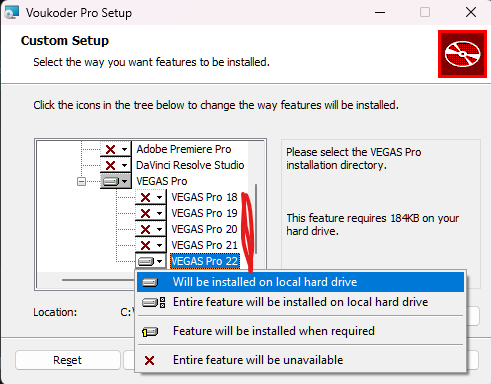
In the Voukoder Pro installer, did you select the VEGAS Pro plugins to install on the first pages?
-
This build includes all recently added languages:
- Chinese
- Japanese
- Korean
- Russian
- Brazilian (Portuguese)
- French
- Spanish
- German
Note: Many options, parameters, etc ... are taken from FFmpeg. These have not been translated and are out of my responsibility.
Create your BETA license here: (Click)
P.S.: If your license is not working anymore, request a new license, please.
P.S.: If you need more languages I can ask the AI to create more, just tell me.