

Beiträge von amissat

    Sorry I didn't follow up sooner. I made several other tries with the same slightly overbrightened end result. Tried reimporting the source file, creating a new sequence, double-checking everything was on Rec. 709, etc. The only thing I didn't try was another codec within Voukouder, instead of SVT-AV1. Something I wanted to do but got distracted. Exporting in HEVC directly through Premiere came out fine.

    So the next thing I'll try is installing the latest version of Premiere 2026 that just came out, the latest version of Voukoder, et cetera, and trying again on vanilla settings. May take me a couple of weeks to find the time, but I'll try to post all my exact settings to make sure someone can reproduce this if I still have this problem. I can't believe Adobe just deleted that post like that.

    [W]hat you need to do is interpret your source videos as rec709, and also make sure your timelines are set to rec709 so that no color conversions are happening, before you send them to voukoder.

    I've you've done all that and are still having problems, I would recommend making a new timeline from your footage, and then copying your edits from the other timeline into it. I had an issue with newer versions of premiere where shots I was rendering for VFX work were coming out slightly higher despite the footage and timeline being set to rec709 before encoding, but copying my edits to a new timeline that was rec709 from the start solved that for me.

    Thank you. It's already set as Rec709, but I'll try your timeline suggestion next week. Hopefully it'll fix it.

    And thank you Vouk for working on it. If you could improve the HDR workflow, it would be a great help.

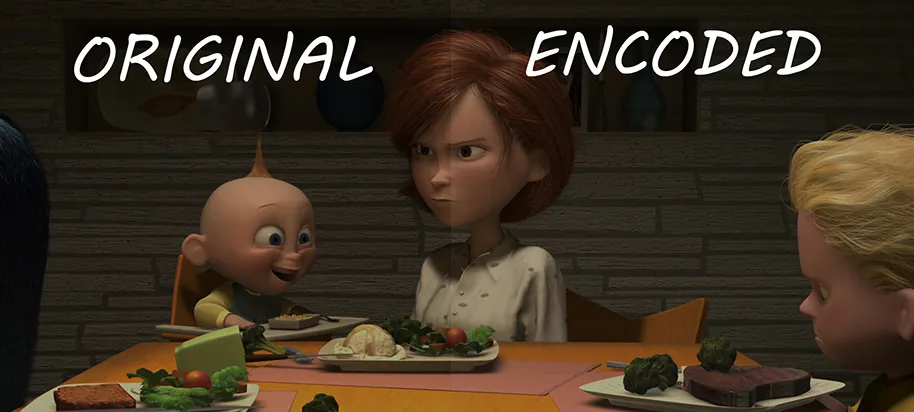
    Hi, can somebody please help me with correctly processing HDR with Voukoder and Premier Pro 2025? I'm trying to set up Voukoder to convert my entire library to AV1, but HDR is giving me headaches. I tried changing all kinds of settings (Matrix/Primaries/Transfer in Voukoder's Video Input, Output Color Space in Sequence Settings, Override Media Color Space in Interpret Footage, etc.), but no matter what I do, the end result is always slightly brighter than the original:

    Here's a short sample of The Incredibles I've been trying to convert:

    Code
    https://filebin.net/gxuq6e3w6qjnwowf 

    And here are the relevant svtav1-params (I removed the rest to make sure it wasn't something else):

    Code
    enable-hdr=1:color-primaries=9:transfer-characteristics=16:matrix-coefficients=10:scd=1

    Any idea what settings I should use to correct this? I'm largely a newb when it comes to encoding HDR, so my hope is that it's something very simple.